Review Management Software — Ask, Reply, and Showcase Reviews on Autopilot
One tool to get more Google reviews, reply to every one with AI, and show them off on your own website — transparent pricing right here, no demo required.
What it actually does
What Review Management Software Actually Does
Three things, done well, beat doing ten things badly.
Reviews don't manage themselves. Left alone, they trickle in slowly, sit unanswered for weeks, and never make it anywhere a new customer would actually see them. Review management software closes that loop in three parts: it helps you ask for reviews without chasing every customer by hand, it helps you reply to every one before it goes stale, and it helps you showcase the good ones where the next customer is already looking — your own website.
RateGather runs all three as one product, not three separate purchases: request tools for asking, a reviews inbox with AI-drafted replies for responding, and embeddable widgets for showing reviews off. Each is covered in its own section below, with real screenshots of the actual app — not mockups.
The problem review management software actually solves is time, not technology. Asking every customer for a review by hand doesn't scale past a handful of jobs a week. Replying to reviews thoughtfully — matching tone, actually addressing what a customer said — takes real attention, so it's the first thing that slips when the phone won't stop ringing. And even businesses that do both well often never get around to the third step: putting those reviews somewhere a new customer will actually see them before they call a competitor instead. Software doesn't make any one of those steps smarter than a person could do it manually — it just makes sure none of the three gets skipped because the week got busy.
Who this is for
Built for Local Service Businesses
Any business that depends on its Google Business Profile to bring in customers.
If most of your new customers find you by searching "near me" or scrolling the Google Maps results before they ever land on your website, your review count and how you respond to reviews are doing real selling on your behalf — whether or not anyone is actively managing them.
Ask
Ask for Reviews, on Autopilot
Every review request starts from a direct link to your Google review form — no customer hunting for your business on a search results page. RateGather gives you a QR code to put on a receipt or countertop sign, a short link to text or email right after the job, and an email template so you're not writing the ask from scratch each time.
Autopilot adds printable marketing posters for the counter or waiting room, on top of removing the caps on the tools above entirely.
None of this replaces asking well — a QR code on a receipt still only works if someone hands the receipt over and mentions it. What it removes is the busywork: building a link, generating a QR code, and writing an ask from scratch every single time, for every single customer.
Free: 1 QR code, 1 short link, 1 email template (RateGather-branded). Autopilot: unlimited QR codes, short links, and email templates, plus printable posters.
Want the full tactical playbook — exactly what to say, when to ask, and what Google's rules actually allow? See 16 ways to get more Google reviews, or generate your free review link right now with the Google review link generator — no signup required.
Free, no-signup tool
Reply
Reply to Every Review Without Writing One Yourself
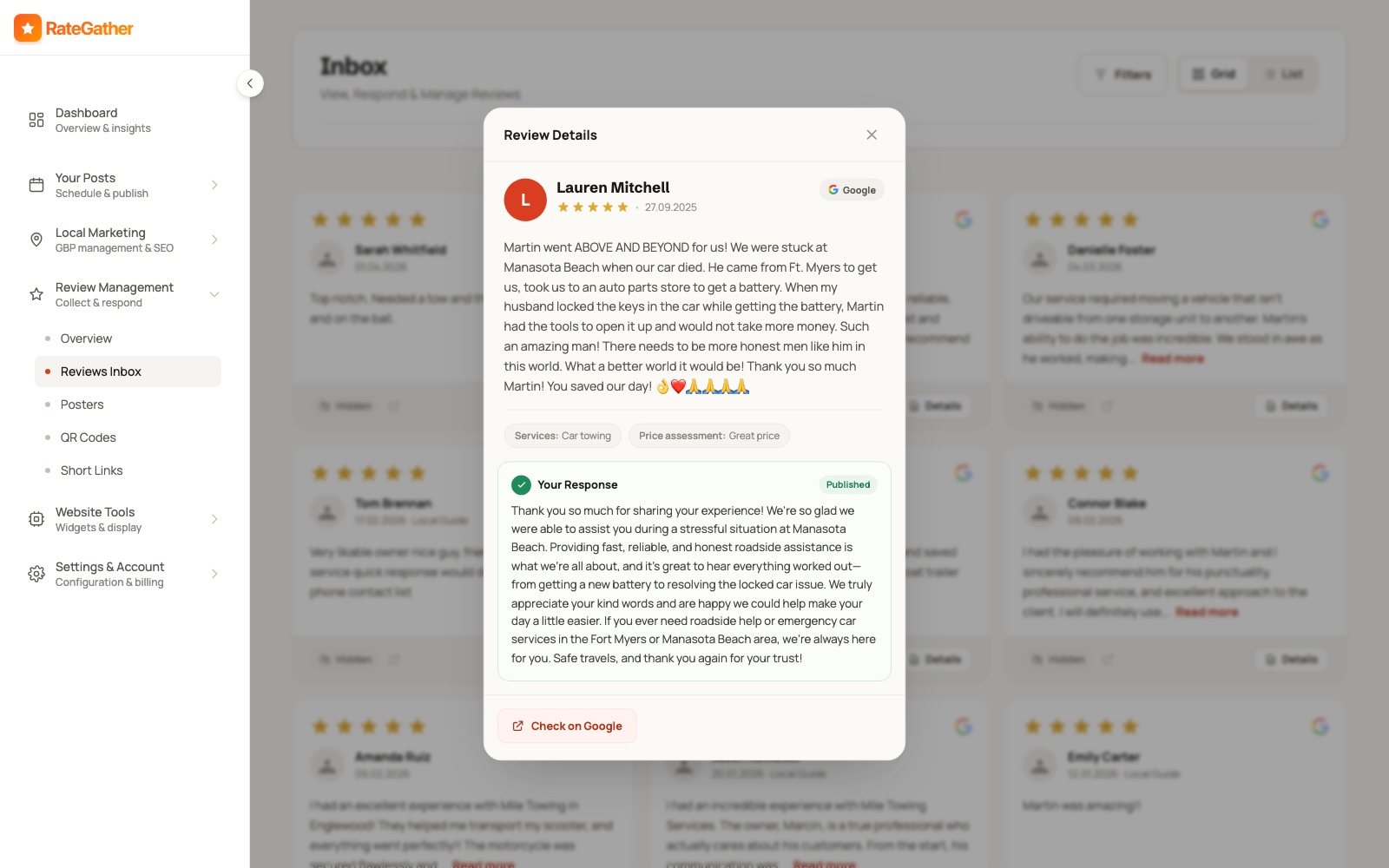
Every new Google review lands in one Reviews Inbox. The moment it arrives, RateGather drafts a personal, on-brand reply — positive, negative, or a middling three-star — matched to the tone of your previous replies, not a generic template.
You choose how hands-off to be: auto-publish replies as they're drafted, or approve each one before it goes live. Either way, nothing sits unanswered while you're busy running the business.
A negative review handled well — a calm, specific, on-brand reply, fast — reads better to the next customer than a business with only five-star reviews and zero replies at all. That's the part manual review management usually skips first, because replying to a bad review is exactly the task people put off.
AI review replies are included on both the Free and Autopilot plans — this isn't an upsell. Autopilot checks for new reviews daily; Free doesn't have a stated check frequency.
Showcase
Show Your Reviews Off, On Your Own Site
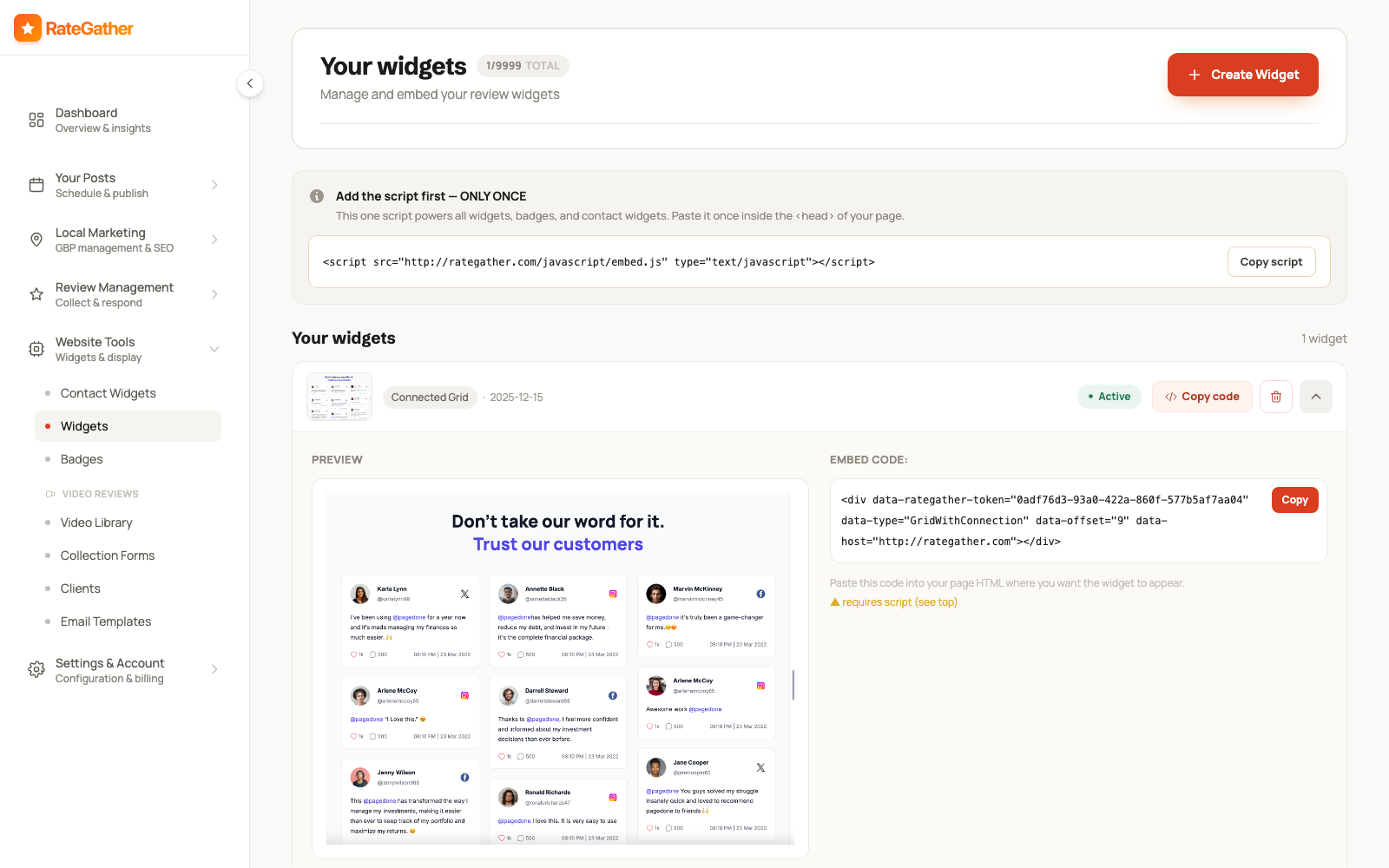
A good review that only lives on your Google Business Profile is doing half its job. Paste one script into your site once, then drop in review widgets and star badges wherever you want proof to show — a homepage, a services page, a footer. It works on WordPress, Wix, Squarespace, or plain HTML, no code required.
New reviews appear on the widget automatically the moment they land in your inbox — nothing to re-embed, no manual copy-paste when a new 5-star review comes in.
The same product area also handles video testimonial collection: send a customer a link, they record on their phone, and it lands in your library ready to embed alongside your written reviews.
Star badges and contact widgets round out the same set — a small floating rating badge, or a tap-to-call button so a visitor can reach you without hunting for a phone number. All of it is the same one-script setup; you add widgets by choosing what to show, not by editing code.
Free: 1 review widget, RateGather-branded, plus 5 stored video testimonials. Autopilot: unlimited widgets and video testimonials, unbranded.
What it costs
What It Costs — No Demo Required
Full pricing, right here on the page. Most tools in this category ask you to book a call before they'll tell you a number — we'd rather just show you.
Free
$0/mo
No credit card · cancel anytime · no contract
1 QR code · 1 short link · 1 email template · 1 branded widget · AI replies to every review
Start freeAutopilot
$79/mo
or $63/mo billed yearly · cancel anytime
Unlimited QR codes, links & templates · printable posters · daily review checks · unlimited unbranded widgets
Start with AutopilotNo minimum term on either plan. See the full pricing comparison or every automation broken down on the features page.
We're not going to pretend everyone in this category charges the same way — plenty of review management tools run per location and land somewhere in the range of a modest monthly retainer before you've even asked a question. What's consistent across the ones we researched for this page is that the number itself usually isn't on the page you're reading; you find out after a call. Ours is above, in full, before you've given us an email address. If you're specifically weighing us against Podium, we broke down pricing and features side by side on our Podium alternative page.
Real proof, not a testimonial
See It Live: Mile Towing
We don't have a wall of case studies yet — what we can show you is a real client site, live right now, using this exact product.
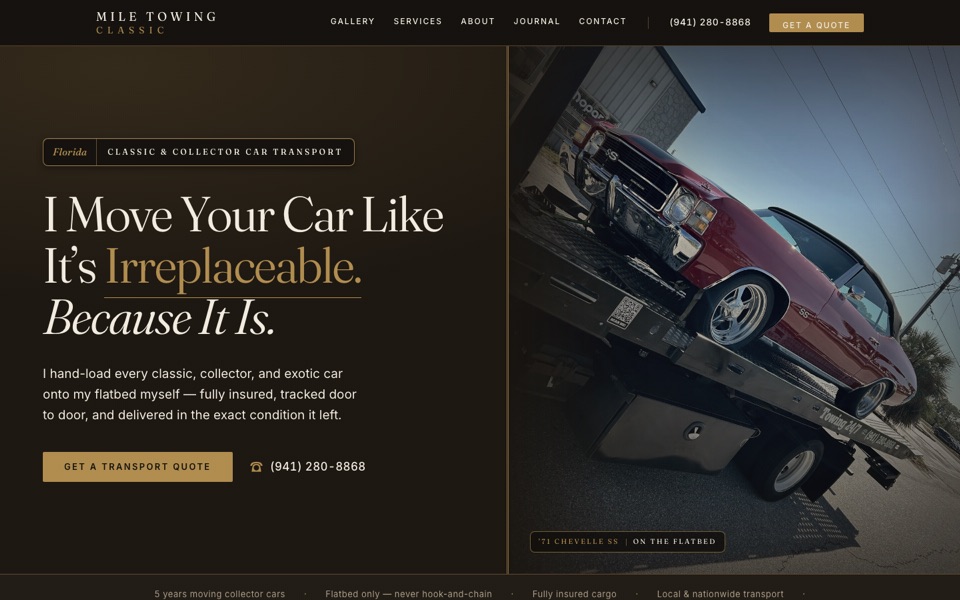
Its Google reviews run through the same request tools, inbox, and widgets covered above. See how review management fits into the bigger local SEO picture on local SEO services.
One honest note
Google Reviews, Specifically — Not a Multi-Platform Tool
Worth stating plainly rather than letting the page imply more than the product does.
RateGather's review management runs on your Google Business Profile: the reviews inbox, AI-drafted replies, request tools, and rank tracking all work against Google specifically. If most of your reviews live on Google, that's exactly where this product spends its effort. It doesn't pull in or manage reviews from Yelp, Facebook, or other platforms today — we'd rather say that up front than have you find out after signing up.
Straight answers
Frequently asked questions
Software that helps you ask customers for reviews, reply to the ones that come in, and display them somewhere new customers will see them — without you doing each step by hand, every time. RateGather runs all three from one dashboard.
No — today RateGather is built around Google. The reviews inbox, AI-drafted replies, review request tools (QR codes, links, email templates, posters), and rank tracking all run against your Google Business Profile specifically. We don't claim to aggregate Yelp, Facebook, or other platforms, and we'd rather say that plainly than imply otherwise.
RateGather: Free at $0/mo (no credit card required), or Autopilot at $79/mo ($63/mo billed yearly), both with no minimum term. Most tools in this category are priced per location and often don't show a number until after a sales call — see the pricing section above for exactly what's included at each tier.
No. RateGather drafts a reply the moment a review comes in — positive, negative, or three-star, matched to the tone of your previous replies. You can auto-publish or approve each one first, and AI replies are included on both the Free and Autopilot plans.
Yes. Paste one script into your site once, then embed review widgets and star badges wherever you like. It works on WordPress, Wix, Squarespace, or plain HTML, and new reviews show up automatically with nothing to re-embed.
Yes — $0/mo, no credit card required, no contract. It includes 1 QR code, 1 short link, 1 email template, and 1 branded review widget, plus AI replies to every review.
Unlimited QR codes, short links, and email templates, printable posters (Autopilot-only), daily checks for new reviews, and unlimited unbranded review widgets and star badges — for $79/mo, or $63/mo billed yearly.
Not for asking or replying — those run directly against your Google Business Profile. You only need a website for the last part: embedding a review widget so visitors see your reviews without leaving your site.
Start managing your Google reviews on autopilot.
Free plan available, no credit card required. Upgrade to Autopilot ($79/mo, or $63/mo billed yearly) whenever you're ready.
No contract. No demo required. Cancel anytime.