Local SEO for Landscapers: The Full Playbook for Getting Found on Google
Landscaping is bought with the eyes and booked in a rush every spring — the jobs go to the crew whose work shows up first. This is how you become that business, five steps, in order, no invented results.
Start free — no card requiredReal product screenshots, real free tools you can use on this page, and no fabricated case studies or stats.
Why it matters
Why Landscaping Is a Visual, Seasonal, Two-Audience Business
Three things make landscaping unlike the trades around it, and all three change how local search works for you. It's the most visual trade, its demand arrives in seasonal waves, and it serves two very different buyers at once.
Start with the visual part, because it's the biggest lever you have. A homeowner choosing a plumber mostly wants to know you'll show up and fix the leak; a homeowner choosing a landscaper is imagining what their yard could look like, and the only way to sell that is to show it. When someone compares three landscaping companies on Google, they are scrolling photos — completed patios, transformed front yards, clean stripes on a freshly cut lawn — long before they read a description. That makes your Google Business Profile less like a listing and more like a portfolio, and the businesses that win are the ones treating it that way.
The second feature is rhythm. Landscaping demand doesn't sit flat; it moves in waves across the year. Spring is the surge — cleanups, mulch, planting, and the big design-and-install projects homeowners have been picturing all winter. Summer settles into a recurring base of mowing and maintenance. Fall brings leaf cleanup, aeration, and the last of the season's hardscape work, and in colder markets winter is either snow removal or the quiet stretch you use to plan and sell next year's projects. That shape matters because two different kinds of money live inside it: recurring maintenance — weekly mowing, seasonal contracts — is lifetime value that compounds client by client, while a paver patio, an irrigation system, or a full redesign is a large one-time ticket. A profile and a keyword strategy that ignore this rhythm end up chasing the wrong searches at the wrong time of year.
The third feature is that you're really serving two audiences. Residential homeowners search emotionally and visually, decide fast when the yard bothers them, and respond to curb appeal and design ideas. Commercial accounts — HOA boards, property managers, facilities teams — care about something almost opposite: crew capacity, proof of insurance, reliability across a full season, and whether you'll hold a contract without drama. Both find you through local search, but they're convinced by different things once they land, and a page that tries to speak to both in one generic voice usually lands with neither. Keeping this split in mind shapes every step below.
One more structural note that colors the whole guide: most landscapers are a service-area business. You work at the customer's property, not a storefront they visit, and plenty of crews run out of a truck and a home office. Google supports that setup directly, but it has to be configured deliberately — get it wrong and you either hide from searches you should win or risk a suspension. The searches themselves cluster around a predictable set of intents, and the rest of this guide is built around winning them rather than generic "landscaping services" language:
There's a shift stacked on top of all of this: more homeowners now ask an AI assistant "who's a good landscaper in [city]?" before, or instead of, opening Google Maps. Those assistants lean on the same underlying signals — an active, well-reviewed, well-described profile with real photos — to decide who to recommend, so the landscapers who show up well in traditional local search are increasingly the same ones surfaced by AI. Every step below feeds both.
Step 1
Set Up a Photo-First, Service-Area Google Business Profile
For a visual, mobile trade, your Google Business Profile is both your portfolio and your storefront — and it has to be configured as a service-area business, not a fake shop. If you do one thing on this page, do this one.
A handful of setup mistakes show up on landscaping profiles over and over, and each one quietly costs you searches. The most common is treating a service-area business like a storefront: either publishing a home address that shouldn't be public, or worse, inventing an office at a spot you don't staff, which is exactly the kind of thing that triggers a suspension. If you serve customers where they live, mark yourself as a service-area business, hide the address, and define your coverage by the towns and zips you actually drive to — that's what decides whether you appear for a "landscaper near me" search two towns over. The next most common miss is a generic primary category like "Contractor," which dilutes how strongly Google ties you to landscaping-specific queries, and a thin description that names none of your services or areas.
Because this is the visual trade, the photo section deserves its own habit, not a one-time upload. Add fresh before-and-after shots as you finish real jobs, tag them to the work (patio, front-yard redesign, seasonal cleanup), and keep a mix that shows both your recurring maintenance and your bigger installs — that range is what tells a browsing homeowner you can handle their specific project. A profile that added a dozen new completed-yard photos this month reads completely differently from one whose newest image is two years old.
Seed the Q&A section yourself, too, with the questions you already field on every estimate: "do you offer seasonal maintenance contracts or just one-time jobs?", "are you licensed and insured?", "what areas do you cover?", "do you handle both design and installation?" Left empty, that section invites a competitor — or a random user — to answer for you, sometimes wrongly. This is a summary, not the full walkthrough — categories, attributes, service-area setup, and the posting cadence that keeps a profile looking active all have more depth than fits here. See Google Business Profile optimization for the complete, dedicated guide.
Step 2
Build Review Velocity — and Get Photos Into Those Reviews
Reviews carry the same weight here as anywhere, with one landscaping twist: a review with a photo of the finished yard is doubly persuasive, because it's social proof and portfolio at the same time. Velocity — a steady trickle of recent reviews — matters as much as the total.
The habit that works is simple, and easy to get wrong in one specific way: ask every client, not just the ones you're confident were thrilled. Steering only your best jobs to the review link — while quietly routing a frustrated client to a private email instead — is called review gating, and it's explicitly against Google's own review policy. It's also worse for you: an honest four-star note among a run of fives reads as real people who actually hired you, where a suspiciously perfect wall reads as staged.
Landscaping has two timing wrinkles worth planning around. First, the highest-conversion moment to ask is the final walkthrough, when the client is standing in the transformed yard and the "before" is still fresh in their mind — that's when a text with your direct review link, or a QR code on the final invoice, converts far better than "we'll email you something." Second, recurring maintenance clients don't have a single dramatic finish, so pick a natural high point — after the first cleanup of the season, or when a lawn has clearly turned the corner — and ask then, rather than never asking because there was no big reveal. And whenever you can, nudge the client to add a photo of the finished work to their review; for a visual trade, that image does more than the words.
Get your direct review link and QR code, free
No signup. Search your landscaping business, get a link that opens straight to the review box, and a QR code you can print on final invoices or leave with the client — in under a minute.
Collecting the review is half the habit — replying is the other half. A warm, specific reply to a glowing review ("glad the new front bed came together — enjoy it this summer") reinforces the visual story for the next person reading; a calm, professional reply to a critical one — a dispute over scope, a callback on a dead shrub — tells every future client scanning your profile that you stand behind your work, even when the review stings. Silence on a bad review reads worse than the review did.
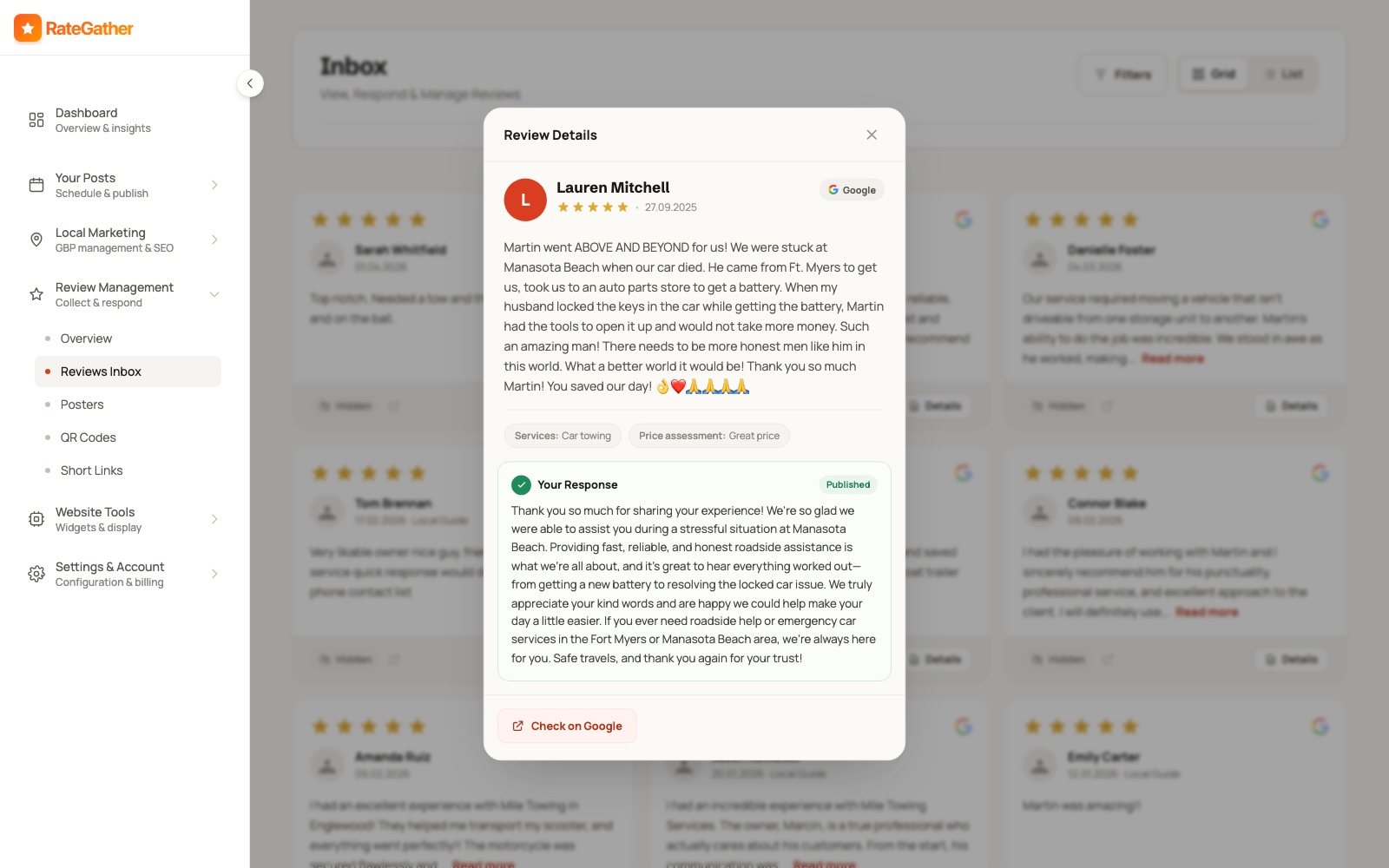
RateGather drafts an on-brand reply the moment a new review lands — positive, negative, or somewhere in between — matched to the tone of your previous replies; you approve each one or let it auto-publish. It generates review links, QR codes, and email templates (one of each on Free, unlimited on Autopilot), and this section only covers the ask itself — 16 ways to get more Google reviews is the full tactical playbook, including timing, wording, and exactly what not to do to stay inside Google's policy. The pattern holds across the trade: landscapers with 40+ recent reviews get noticeably more quote requests than ones with a handful — treat that as a milestone to build toward with steady asks on every job, not a number to chase with a one-time push.
Step 3
Track Where You Actually Rank Across Your Service Area
A single 'are we #1' check hides more than it shows. Map-pack ranking varies by exact location — a landscaper can rank #1 near home and #9 in the next town over, for the same search — and for a service-area business that spread of coverage is the whole point.
That's what a grid rank tracker is for: instead of one search from one point, it checks your position from dozens of points across your actual service area and plots them on a real map, so you can see precisely where you're strong and where a competitor is beating you. For a mobile landscaping business this is especially concrete — you don't want to know whether you rank on average from your home office, you want to know whether you rank in the specific neighborhoods and towns you're willing to drive to, because those are the jobs worth winning.
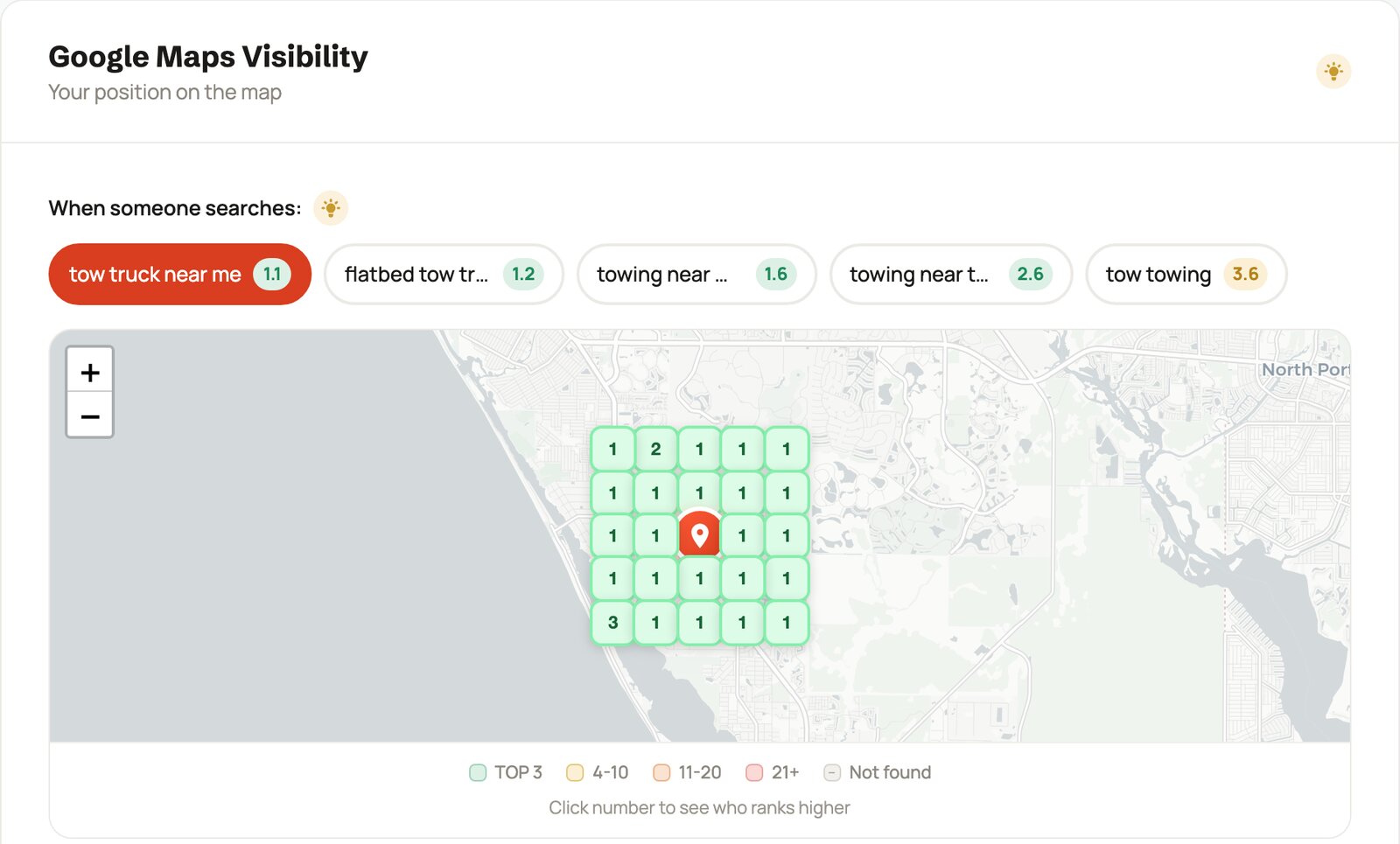
Track the searches that carry the most intent first — landscaper near me, landscaping +
[your city], lawn care service — alongside the higher-consideration, bigger-ticket ones
like landscape design, hardscaping, and sprinkler installation, which
pull homeowners planning a real project rather than looking for routine maintenance. RateGather runs this as a
grid check, with 2 reports a month on Free and 30 a month plus competitor monitoring on Autopilot, so you can
see exactly where a competitor outranks you and by how much.
Because landscaping demand moves with the seasons, your keyword mix should move with it too. Spring pushes
yard cleanup, mulch delivery, and landscape design as homeowners tackle
the projects they sat on all winter; summer is dominated by lawn care service and mowing intent;
fall brings leaf-cleanup and aeration searches; and in snow markets winter shifts entirely toward
snow removal. Tracking the same two "money" keywords all year misses whatever is actually
converting right now. Competitor monitoring on Autopilot pairs well with this — if a rival jumps ahead of you
on landscaping + [city] right as the spring rush opens, that's the moment to know about it, not in
July when the season's biggest projects are already booked with someone else.
Check your landscaping business's ranking, free
Run a real 9-point grid check for any keyword and location, no signup or credit card required — see exactly where you rank around your own base, and in the towns you want to work in, right now.
Step 4
Create Content for Both Homeowners and Commercial Buyers
The questions a homeowner searches around a yard project are visual and seasonal; the things a property manager needs to see are practical and credential-driven. Content that answers both — in the right voice for each — is what shows up for them and reassures them once they land.
This isn't about generic "why choose us" pages. A profile and site that keep publishing — Google Business Profile updates with fresh project photos, plus a handful of articles a month tuned to your services, plants, and climate — read as active; one frozen since last season reads as abandoned, to a homeowner scanning results and to an AI assistant weighing who to recommend. Framed honestly: this makes you more likely to show up in Google and AI recommendations for the questions people actually ask — it's not a ranking guarantee, and nobody who tells you otherwise is being straight with you.
The two-audience split matters most here. For residential search, lean into visual, seasonal, decision-help topics — the questions homeowners actually type before they've chosen anyone. For commercial accounts, the "content" that convinces is different: a clear services page, proof of licensing and insurance, crew capacity, and evidence you can hold a season-long contract reliably. You don't need to choose one; you need to not blur them. A residential-flavored blog and a plainly-written commercial services section can live on the same site as long as each speaks in its own voice.
A handful of topics cover most of what people actually search around landscaping, and they double as genuinely useful Google Posts or short blog articles:
- Spring cleanup checklists — what to tackle first as the yard wakes up, and when to call a pro.
- Native and low-water plant picks for your specific region and climate.
- Paver patios versus poured concrete versus a deck — honest tradeoffs on cost, upkeep, and lifespan.
- A simple guide to irrigation and sprinkler timing that keeps a lawn healthy without wasting water.
- Fall lawn care — aeration, overseeding, the last mow — and why timing it right pays off next spring.
- For commercial prospects: what a good grounds-maintenance contract actually covers, and questions an HOA board should ask before signing.
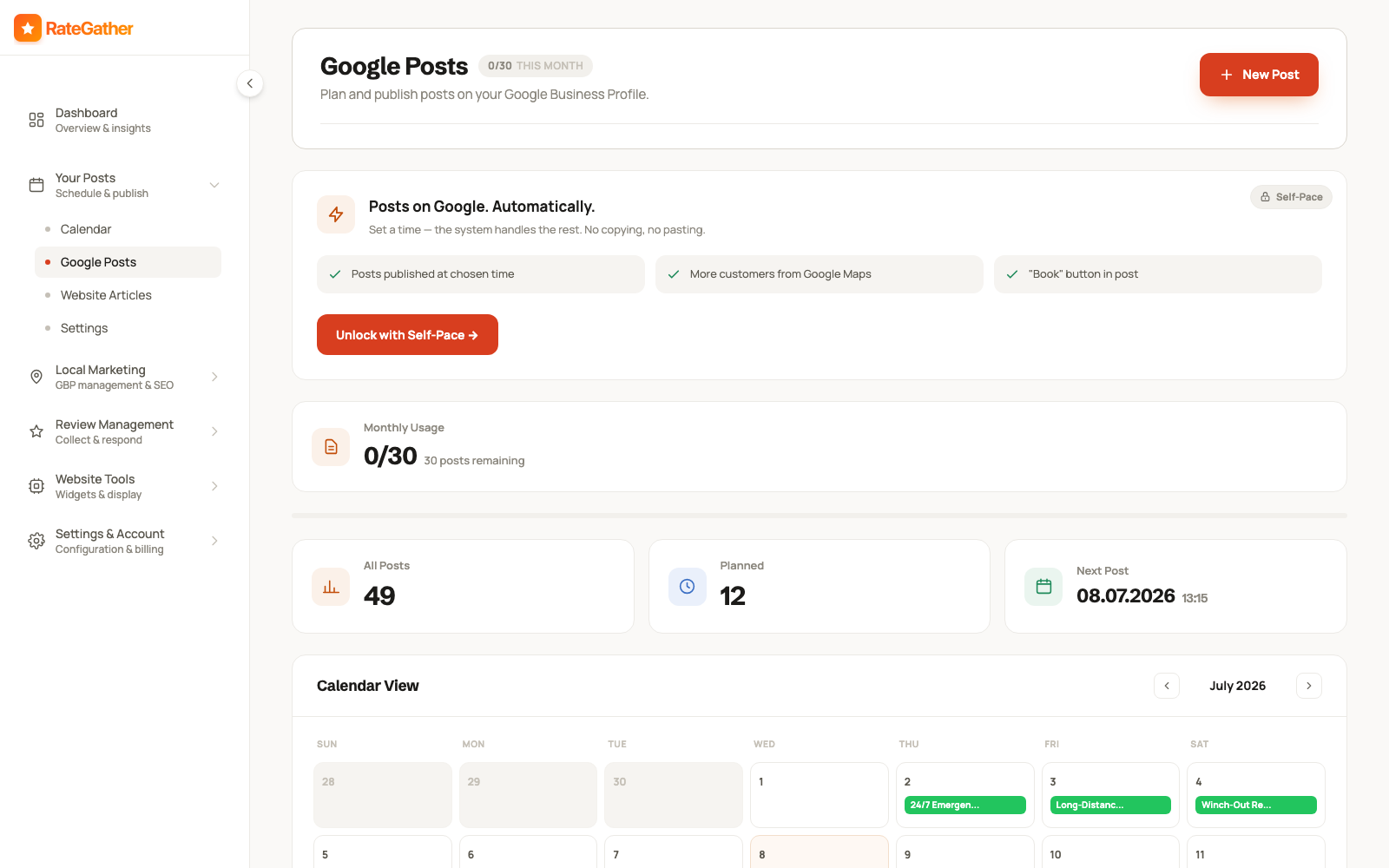
Pair each Google Post with a matching item on your website's content calendar, so the same topic reinforces your profile and your site at once instead of living in only one place. That website does heavy lifting in landscaping, because a visual purchase sends people straight to your galleries and portfolio before they call. See websites for landscapers for how RateGather builds and hosts that side, and a full example at Evergreen Yard Works — a fictional demo build, not a real company, showing how a photo-led layout, service list, and review integration fit together for a landscaping business.
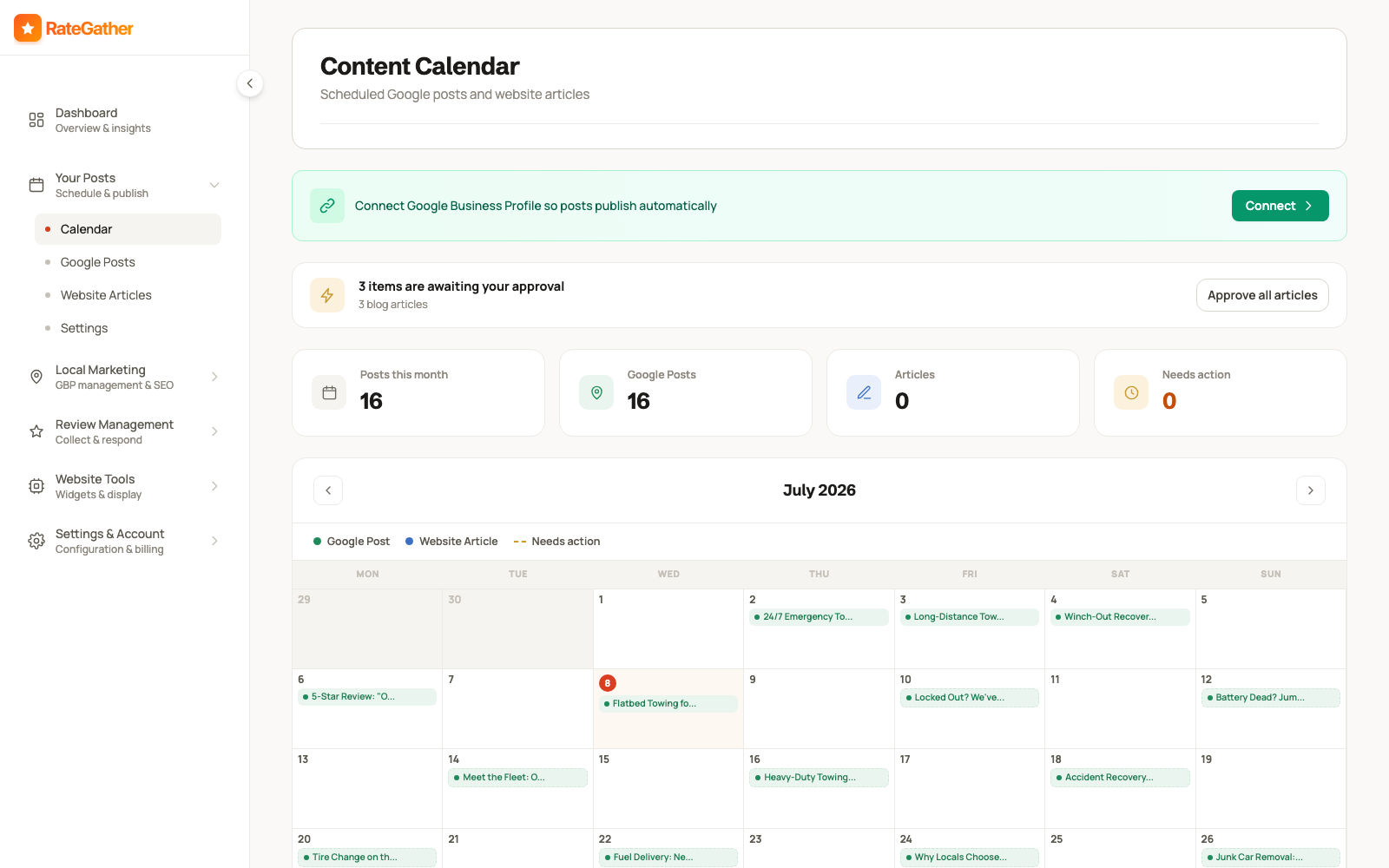
RateGather's AI drafts Google Business posts and blog articles about landscaping topics — seasonal maintenance, design ideas, plant and lawn care, hardscape explainers — on a schedule you set, then you either approve each one or let it auto-publish. Free includes 1 AI Google post and 1 blog draft a month; Autopilot includes 30 posts and 6 articles a month, enough to keep a profile and a site both looking active heading into the spring rush without writing any of it yourself.
Step 5
Keep Your Name, Address, and Phone Consistent Everywhere
NAP is your Name, Address, and Phone number, and it has to line up wherever it appears — your Google Business Profile, your website, and every directory that lists you. For a service-area business, the address part comes with an extra rule.
Inconsistencies creep in without anyone deciding they should. A phone number changes when you add a second line but only gets updated in one place. An old directory still shows the address you moved out of two years ago. Your website says "Landscaping Co." while your profile says "Landscaping Company LLC." No single slip sinks a listing, but taken together these mismatches give Google a reason to be less sure who and where you are — and that uncertainty is exactly what you don't want going into a spring rush, when confident matching decides whether you appear for the searches that spike.
The service-area setup adds one wrinkle a storefront trade never deals with: your address is hidden on your Google profile, so the rule shifts from "show the same address everywhere" to "don't leak a home address into places it shouldn't be." Check that an old listing on a directory isn't publishing the house you run the business from, and that your name and phone are identical across every profile even where the address is deliberately absent. It's a quieter kind of consistency, but it's the one that fits how a mobile landscaping business actually operates.
A sensible sweep to run before the season opens: your website's footer and contact page, your Google Business Profile, and the directories a landscaper is most likely to already sit on — Yelp, Angi, Thumbtack and HomeAdvisor if you use them, Nextdoor, the Better Business Bureau, and your local chamber of commerce. Search your business name plus your city and see what surfaces; stale listings from an old phone line or a prior address are common and worth a correction or removal request. To be straight about tooling: RateGather doesn't scan citations automatically, so this step stays manual, written here as best practice rather than a product feature. The one place you can automate the consistency signal is your own site — LocalBusiness structured data carrying the exact same name, service area, and phone as your profile gives search engines a machine-readable confirmation of who you are. RateGather's free schema generator builds that JSON-LD for a landscaping site in a few minutes, no signup required.
Putting it together
These Five Steps Aren't a Checklist You Finish Once
Run all five once and you'll see a short-term bump. The landscapers who stay booked through the seasons treat them as a loop that keeps turning even in the quiet months, not a one-time project.
Here's what makes landscaping unusual: the payoff and the effort land in different seasons. The profile you keep current, the reviews you keep collecting on every job, and the content you keep publishing through the slow winter stretch are exactly what's already ranking when the spring quote requests arrive all at once. A profile set up perfectly in March and left alone reads as stale by the following spring. Reviews you stop asking for after a busy summer taper off right as recency matters most. Photos that made your gallery sing last year stop looking current the moment a competitor's newer work appears next to yours in the results. The crews that consistently show up first aren't the ones who did local SEO for a month — they're the ones who kept the GBP current, asked for a review with a photo on every completed yard, watched the grid across their whole service area, and kept publishing, on a rhythm measured in weeks.
That gap between when you do the work and when it pays off is the entire reason RateGather exists as software rather than a one-time audit. The free tools above — the review link generator, the rank checker, the schema generator — work perfectly well as one-off manual checks. The app automates the repeating part of the loop so it keeps running through the off-season, and you're already ranked, reviewed, and stocked with fresh photos when the busy months open and everyone in your area starts searching at once.
What it costs
What This Costs
No hidden retainer, no setup fee — the exact figures a landscaping business sees on RateGather.
Free — $0/mo
Autopilot — $79/mo ($63/mo yearly)
See the full feature-by-feature breakdown for a landscaping business on /industries/landscaper, or compare against the wider local SEO category on pricing.
Straight answers
Frequently asked questions
Think in months, not days, and how fast depends on your market and where you're starting. There's a timing angle unique to landscaping, though: the work you put in over winter is what's already ranking when the spring quote requests start pouring in. Nobody can honestly promise a set date or a specific position — watch your grid rank tracker move over the weeks and read the trend, not a calendar.
More than for any other trade on this list. Landscaping is bought with the eyes — a homeowner deciding between three companies is scrolling completed-yard photos before they read a single word. Before-and-after shots of real projects, loaded regularly, are the single most persuasive thing on your profile, and a profile that keeps adding fresh work reads as a busy, established crew rather than a dormant listing.
Set it up as a service-area business. You serve customers at their property, not yours, so you list the towns and zip codes you cover and hide your home address instead of publishing it. That's the supported, policy-correct setup for a mobile trade — see Google's own guidance on service-area businesses. Faking a storefront you don't staff, or listing a UPS box as an office, is the kind of thing that gets a profile suspended.
There's no official cutoff, but the pattern is steady: landscapers with 40+ recent reviews get noticeably more quote requests than ones with a handful. Treat 40 as a milestone to build toward, not a finish line — recency keeps mattering after you pass it, and reviews that mention specific projects (a paver patio, a full front-yard redesign) carry more weight with the next homeowner than a generic "great job."
They're two different games and your content should reflect it. Homeowners search emotionally and visually — design ideas, curb appeal, "what will this cost." HOA boards and property managers care about reliability, insurance, crew capacity, and holding a recurring contract without drama. If you want both, it usually means two threads: visual, seasonal content for residential search, and a services/credentials section that speaks plainly to commercial decision-makers. Trying to say both things in one generic voice tends to land with neither.
Two plans, no contract on either. Free at $0/mo lets you see where you stand: 1 ranking report, 1 AI Google post, 5 AI review replies a month, QR codes, and a review widget. Autopilot at $79/mo ($63/mo billed yearly) keeps the whole loop running through the seasons: 30 ranking reports, competitor monitoring, daily review checks, 30 AI Google posts, and 6 blog articles a month. No credit card required to start on Free.
Yes. Sending your review link only to the clients you're already sure loved the job, or quietly routing an unhappy one to a private email instead of the public review form, is called review gating, and it breaks Google's review policy. Ask every client, every finished job, and let each review land where it lands — 16 ways to get more Google reviews has the full policy-safe approach.
This page is the how-to: the five-step framework, in order, with the reasoning behind each step for landscaping specifically. /industries/landscaper is the shorter product page — what RateGather does for a landscaping business and what it costs. Read this one first if you want the playbook; go there if you already know you want the software.
This guide is the playbook. For the wider category beyond landscaping, see local SEO services; for the landscaper-specific product page with the full feature list, see /industries/landscaper; and for the website side, see websites for landscapers.
Be the crew they find when the yard bugs them.
Free plan available, no credit card required.
No contract. No ranking guarantees. Cancel anytime.