Local SEO for HVAC Companies: The Full Playbook for Getting Found on Google
When the AC quits in July or the furnace dies in January, customers call whoever shows up first. This is how you become that company — five steps, in order, no invented results.
Start free — no card requiredReal product screenshots, real free tools you can use on this page, and no fabricated case studies or stats.
Why it matters
Why Local SEO Runs on a Different Clock for HVAC Than Any Other Trade
Most trades have steady demand you build against year-round. HVAC has two hard demand peaks a year — and being invisible during either one costs you a whole season.
Heating and cooling is feast or famine in a way few local services are. When the first heat wave hits, every homeowner with a failing AC searches at once; when the first hard freeze arrives, the furnace calls stack up overnight. In those windows a huge share of the volume is an emergency — no cool air on the hottest day of the year, no heat with a newborn in the house, a system that quit right before a holiday — and the customer isn't collecting five quotes, they're calling the first HVAC company that looks credible and available. If your Google Business Profile isn't in the top three results when that window opens, in practice you don't exist for it, and the window won't wait for you to catch up.
That urgency skews HVAC searches heavily toward mobile — someone standing in front of a thermostat that won't respond is on their phone, not comparison-shopping on a desktop the next morning — which makes a fast, complete, click-to-call profile matter even more than the raw ranking. National franchise brands and private-equity-backed chains know all of this and spend accordingly on visibility; independent contractors compete on the same map pack with a fraction of the budget. That's exactly where local SEO, not paid ads, closes the gap, because profile completeness, reviews, and consistent seasonal activity are free to build and compound over time instead of stopping the moment you stop paying for clicks.
HVAC also carries a second kind of search the emergency framing misses: the planned system replacement. A homeowner whose ten-year-old unit is limping through one more summer spends days researching efficiency ratings, rebates, and financing before they ever call — a longer, higher-consideration decision worth far more than a single repair. The searches cluster around a predictable set of intents spanning both the panic and the planning, and building visibility around these specific queries — not generic "HVAC services" language — is what the rest of this guide is built around:
There's a third shift stacked on top: more homeowners now ask an AI assistant "who's a good HVAC company in [city]?" instead of, or before, opening Google Maps. Those assistants lean on the same underlying signals — an active, well-reviewed, well-described profile and site — to decide who to recommend, which means the companies that show up well in traditional local search are increasingly the same ones getting surfaced by AI. Every step below feeds both, and every step compounds if you start it in the mild months instead of the middle of the rush.
Step 1
Get Your Google Business Profile Right
Your Google Business Profile is what a customer sees before your website ever gets a click — for an emergency AC or furnace search, it's often the only thing they see. If you do one thing on this page, do this one.
A few mistakes show up disproportionately often on HVAC profiles specifically, and each one is a quiet way to lose seasonal searches: a primary category of "Contractor" or "Home improvement" instead of "HVAC Contractor," which dilutes how strongly Google matches you to heating-and-cooling queries; a service area left at its default radius instead of the towns you actually cover; and an "online estimates" or emergency-service attribute left unset even when you offer it. Your business description and the Services section are also worth filling in with the exact jobs you take — AC repair, furnace repair, air conditioning installation, heat pump service, duct cleaning, seasonal tune-ups — rather than one generic "full-service HVAC" line, since that's more of what both searchers and Google's matching have to work with.
The Q&A section is worth seeding yourself, too — post and answer the questions you already field on every call ("do you charge a diagnostic fee?", "do you service my brand of unit?", "how fast can you come out in this heat?", "do you offer financing on a new system?"). Left empty, it invites a competitor or a random user to answer for you, sometimes incorrectly, on exactly the questions that decide a high-ticket replacement.
This is a summary, not the full walkthrough — categories, attributes, Q&A, and the posting cadence that keeps a profile looking active all have more depth than fits here. See Google Business Profile optimization for the complete, dedicated guide.
Step 2
Build Review Velocity, Not Just Review Count
A profile with 60 reviews from two summers ago reads worse to both customers and Google than one with 25 reviews added steadily across the last few months. Velocity — a consistent trickle of new reviews through both seasons — matters as much as the total.
The habit that actually works is simple and easy to get wrong in one specific way: ask every customer, not just the ones you're confident were happy. Routing only your smooth installs to the review link — while quietly steering a frustrated customer to a private email instead — is called review gating, and it's explicitly against Google's own review policy. It's also worse for credibility: an occasional honest three-star review next to a string of five-stars reads as more real than a suspiciously perfect record, which matters more in HVAC because a homeowner about to spend several thousand dollars on a new system is reading your reviews with a skeptical eye.
For HVAC specifically, the moment right after the job — cold air blowing again, the furnace relit, the invoice handed over — is the highest-conversion moment to ask, because relief is fresh and the customer's phone is usually already in their hand. Train your techs to ask on-site: a QR code on the invoice or a truck-magnet leave-behind, or a text with a direct review link sent before they pull out of the driveway, converts far better than "we'll email you something later." Reviews collected the day of the fix, in the middle of a heat wave, are also the ones that show up freshest to the next dozen panicked homeowners searching that same week.
Get your direct review link and QR code, free
No signup. Search your business, get a link that opens straight to the review box, and a QR code you can print on invoices or hand out on the truck — in under a minute.
Getting the review is half the habit — replying to it is the other half, and it matters more for HVAC than most trades because the job involves letting a technician into a home, often during a stressful, sweltering, or freezing moment, and often for a large bill. A fast, professional reply to a negative review (a dispute over a diagnostic fee, a repair that needed a second visit, a quote that came in higher than expected) reads to every future customer scanning your profile as "this company takes ownership," even when the review itself is unflattering. Silence on a bad review reads worse than the review did.
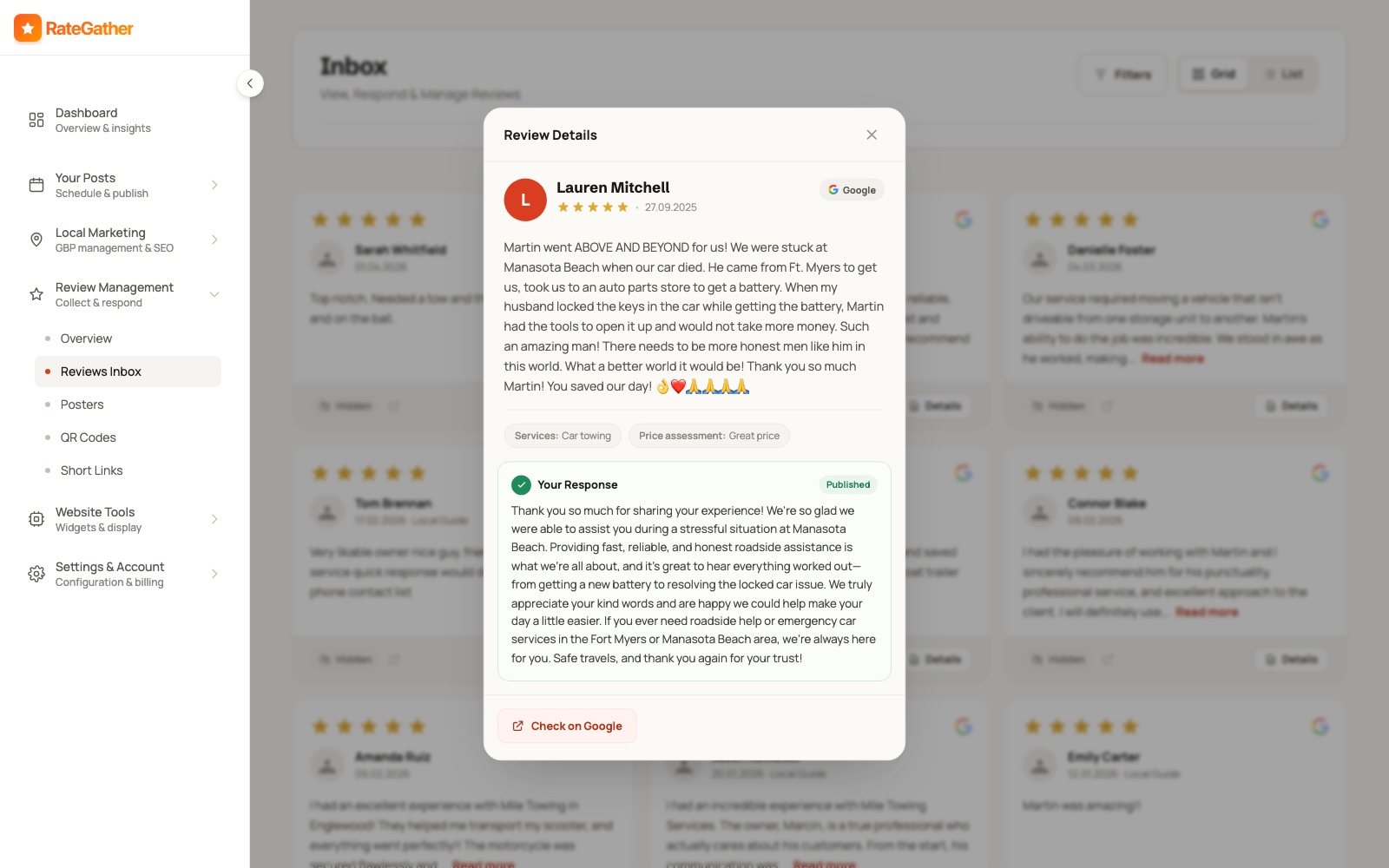
RateGather drafts an on-brand reply the moment a new review comes in — positive, negative, or three-star — matched to the tone of your previous replies; you approve each one or let it auto-publish. It generates unlimited review links, QR codes, and email templates on the Autopilot plan (one of each on Free), and this section only covers the ask itself — 16 ways to get more Google reviews is the full tactical playbook, including timing, wording, and exactly what not to do to stay inside Google's policy. The pattern holds across the trade: HVAC companies with 40+ reviews get significantly more calls than ones with a handful — treat that as a milestone to build toward with steady asks through both seasons, not a number to chase with a one-time push before summer.
Step 3
Track Where You Actually Rank
A single 'are we #1' check hides more than it shows. Map-pack ranking varies by exact location — an HVAC company can rank #1 two blocks from its shop and #9 a mile away, in the same city, for the same search — and it shifts as the season and the keyword mix change.
That's what a grid rank tracker is for: instead of one search from one point, it checks your ranking position from dozens of points spread across your actual service area and plots them on a real map, so you can see exactly where you're strong and where a competitor is beating you — not just a single number that might be true from your office and false from the next neighborhood over. For a trade with a wide service radius on install jobs, those edges of the map are often where the highest-value replacement customers are searching.
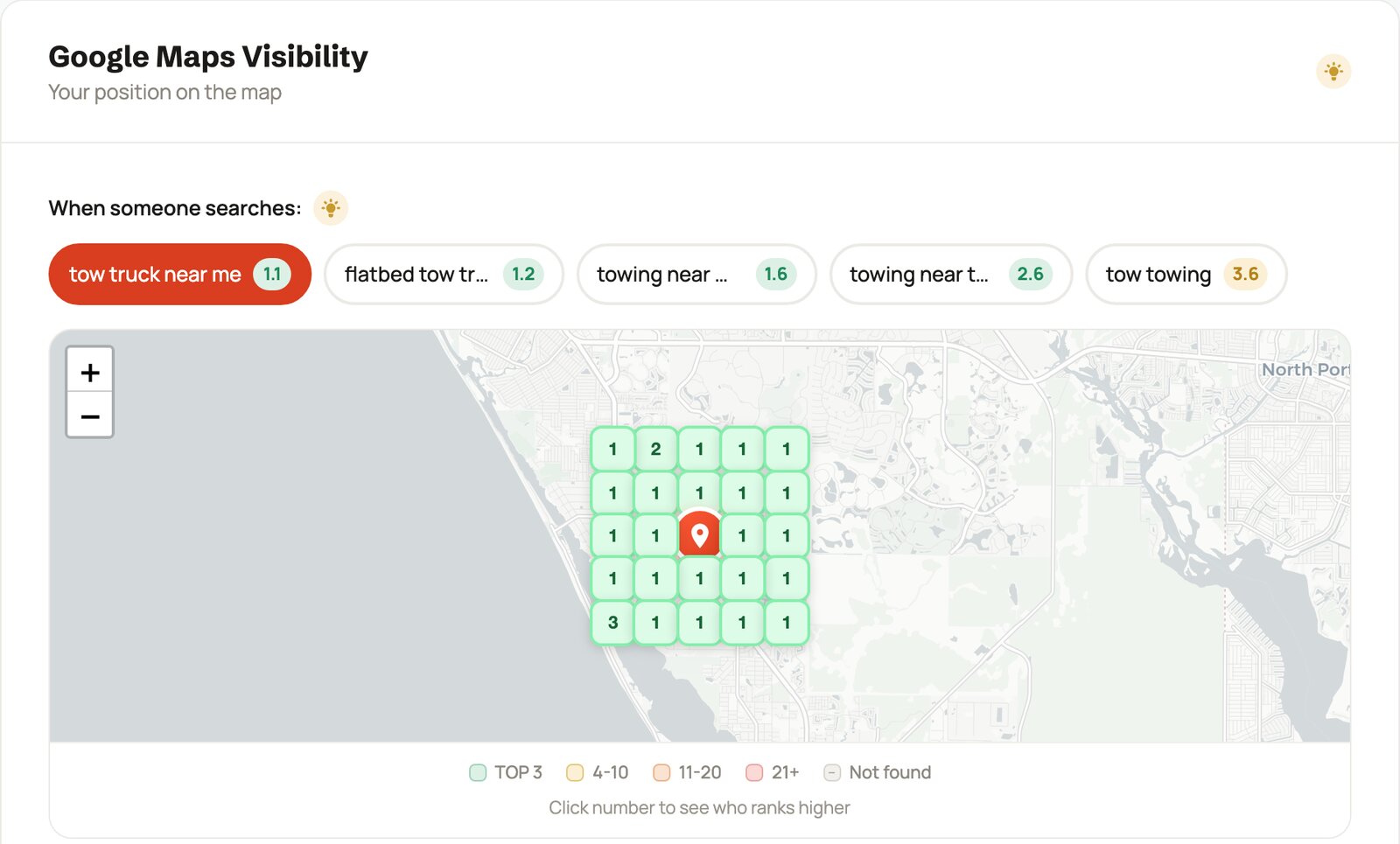
For HVAC specifically, track the searches with the most emergency intent first — HVAC near me,
emergency AC repair, AC repair + [your city], furnace repair — alongside the
higher-consideration replacement terms like furnace installation and air conditioning
service, since those pull in customers who are researching a several-thousand-dollar decision rather than
mid-emergency. RateGather's dashboard runs this as a daily grid check, with 2 reports a month on Free and 30 a month
plus competitor monitoring on Autopilot, so you can see exactly where a competitor outranks you and by how much.
HVAC demand is the opposite of flat across the year, so your tracked keyword mix should swing with the calendar:
cooling terms — AC repair near me, emergency AC repair, air conditioning
service — climb through late spring and peak in the summer heat, while heating terms — furnace
repair, furnace installation, heating and cooling — take over as temperatures drop
in the fall. Tracking only your summer "money" keywords all year means you're flying blind exactly when the furnace
season opens. Competitor monitoring on Autopilot pairs with this well — if a competitor jumps ahead of you on
emergency AC repair right as the first heat wave hits, that's the moment to know about it, not next
quarter when the season's already gone.
Check your HVAC company's ranking, free
Run a real 9-point grid check for any keyword and location, no signup or credit card required — see exactly where you rank around your own shop right now.
Step 4
Create Seasonal Content That Answers Both Peaks
The questions people search — and increasingly ask an AI assistant — split cleanly by season: why the AC is blowing warm air in July, why the furnace won't ignite in January, and whether a fifteen-year-old system is worth repairing at all. Content that answers those directly, published before each peak, is what shows up for them.
This isn't about generic "why choose us" pages. A profile and a site that keep publishing — Google Business Profile updates plus a handful of articles a month, tuned to your specific services and the current season — read as active; one frozen since last summer reads as abandoned, to both a customer scanning results and to an AI assistant weighing which company to recommend. The HVAC-specific move is timing: publish your AC content in spring, before the first heat wave, and your heating content in early fall, before the first freeze, because ranking takes weeks to compound and you want to be in place when the search volume arrives, not chasing it. Framed honestly: this makes you more likely to show up in Google and AI recommendations for the questions your customers are actually asking — it's not a ranking guarantee, and nobody who tells you otherwise is being straight with you.
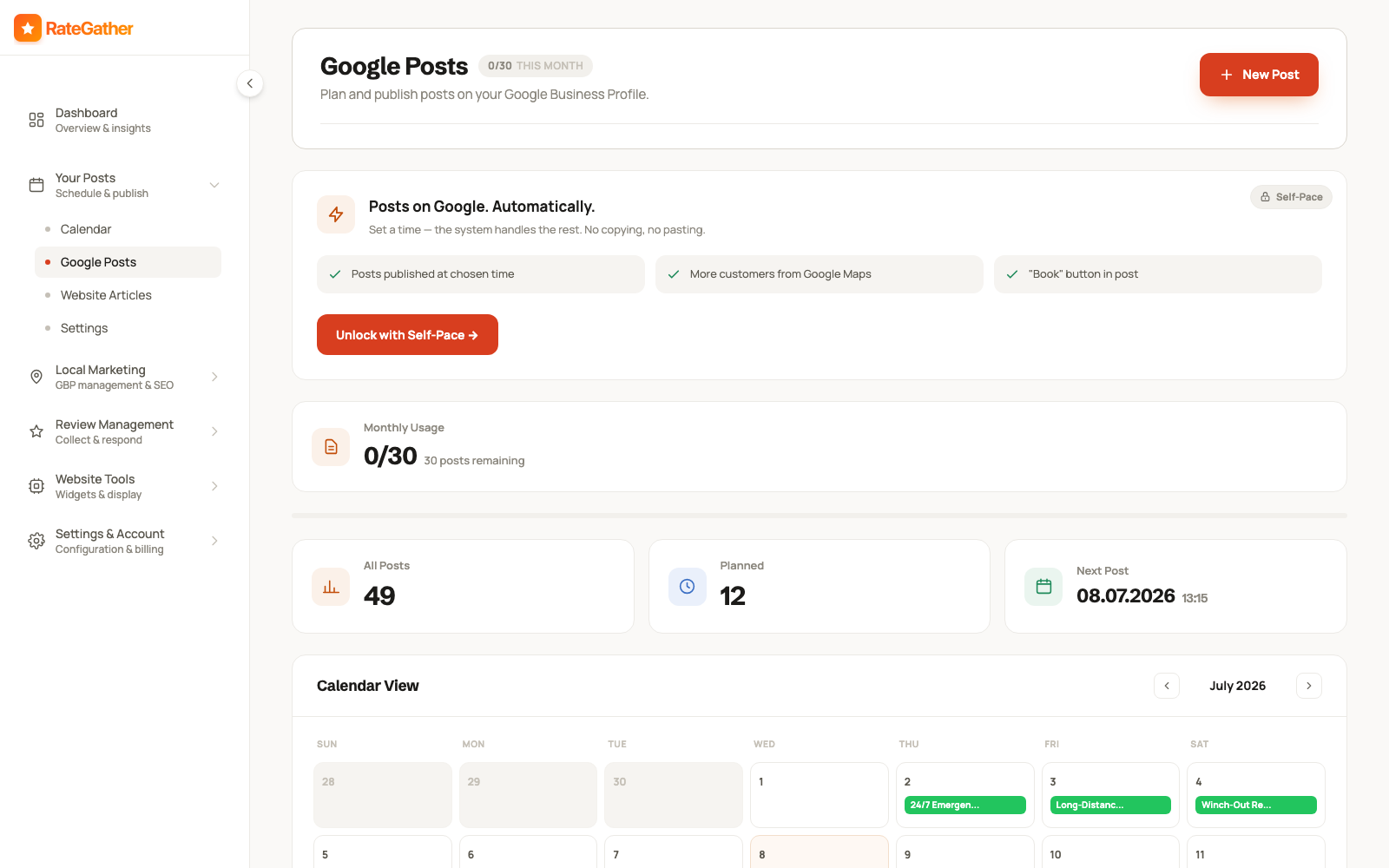
A handful of topics cover most of what people actually search for in the moment, and they double as genuinely useful Google Posts or short blog articles — some for the cooling season, some for the heating season, some for the mild months in between:
- Why your AC is blowing warm air — the causes you can check yourself versus the ones that need a tech.
- Why the furnace won't ignite or keeps short-cycling, and which of those is an emergency.
- Repair or replace: when an aging system is worth fixing one more time versus replacing, and how age and repair cost factor in.
- What SEER and efficiency ratings actually mean for a homeowner's bill, in plain language.
- Spring AC tune-up and fall furnace tune-up checklists — what maintenance actually prevents a mid-season breakdown.
- Frozen AC coils, a musty smell from the vents, or uneven room-to-room temperatures — common causes and which are urgent.
Pair Google Posts with a matching item on your site's content calendar, so the same seasonal topic reinforces your profile and your website at once instead of living in only one place — and so the AC batch is queued for spring and the furnace batch for fall, not scrambled together the week demand spikes.
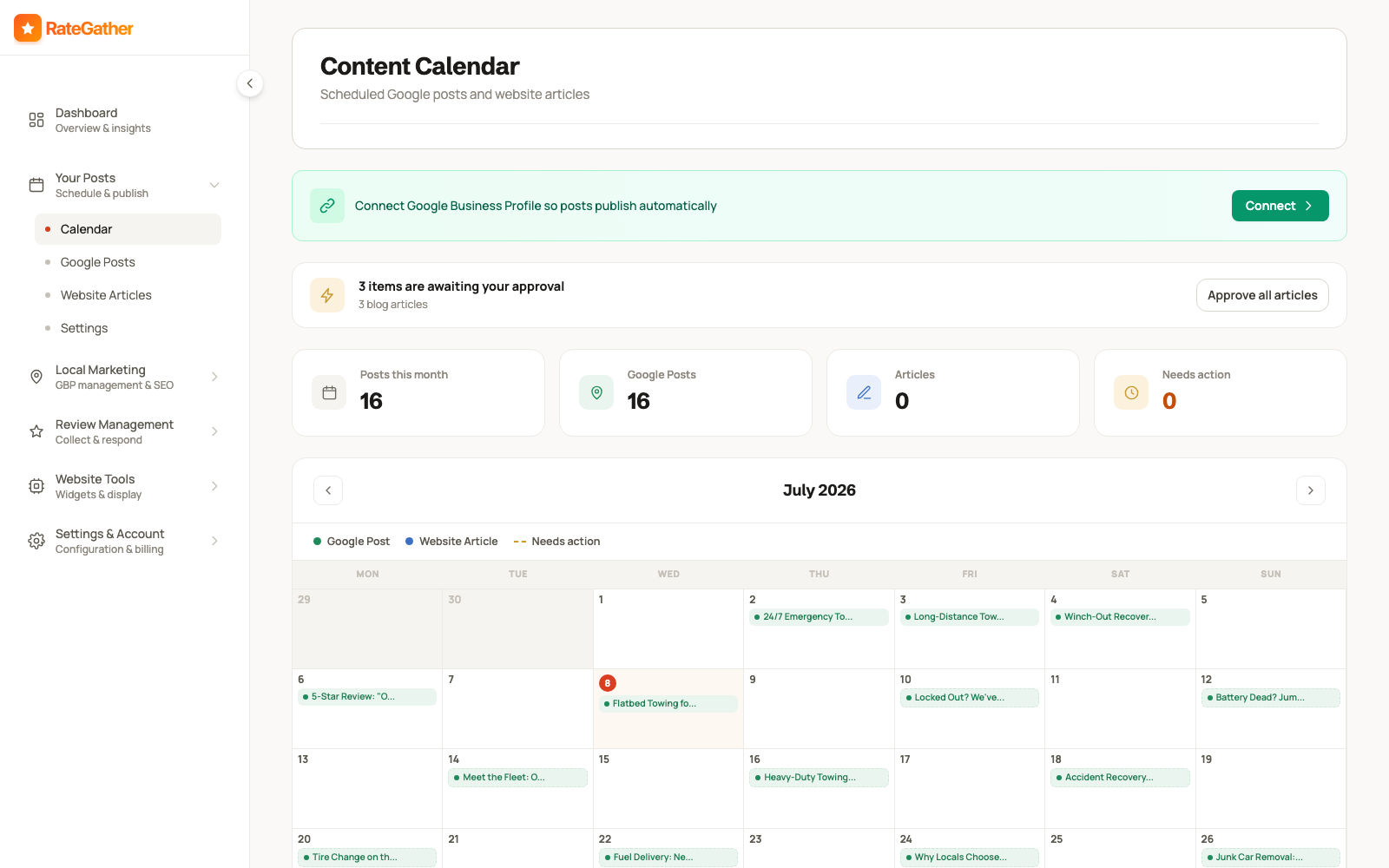
RateGather's AI drafts Google Business posts and blog articles about heating and cooling topics — seasonal maintenance, common problems, efficiency and repair-versus-replace explainers — on a schedule you set, then you either approve each one or let it auto-publish. Free includes 1 AI Google post and 1 blog draft a month; Autopilot includes 30 posts and 6 articles a month, enough to keep a profile and a site both looking active across both seasons without writing any of it yourself.
Step 5
Keep NAP and Listings Consistent
NAP is your Name, Address, and Phone number — and it needs to match exactly everywhere it appears: your Google Business Profile, your website, and any directory, review site, or manufacturer dealer locator that lists you.
A mismatch is easy to create by accident — an old suite number left on one directory listing, "St." on your website but "Street" on your GBP, a phone number that changed after you added a second line for the busy season but only got updated in one place. No single mismatch will sink your listing on its own — but each one chips away at how confident Google is that every mention of your company points to the same real HVAC business at the same address. Put a citation check on the same calendar you use for pre-season tune-up campaigns: twice a year, before each peak.
A reasonable list to check quarterly: your website's footer and contact page, your Google Business Profile, and the directories an HVAC company is most likely to already be listed on — Yelp, Angi, HomeAdvisor and Thumbtack profiles if you use either, Nextdoor, the Better Business Bureau, and your local chamber of commerce. HVAC has one extra citation source most trades don't: manufacturer dealer locators. If you're a Carrier, Trane, Lennox, or other brand-certified dealer, your listing on their "find a dealer" tool carries your NAP too, and an outdated address or phone there sends conflicting signals just like any other citation. Search your business name plus your city and see what turns up; old listings from a previous address or a defunct phone line are common, and worth requesting a correction or removal on rather than leaving live with wrong information.
To be clear about what's product and what's practice: RateGather has no automatic citation scanner, so this step stays a manual one. Where your own website is concerned, though, you can make the confirmation easy for Google — publish LocalBusiness structured data that carries exactly the same name, address, and phone as your profile. RateGather's free schema generator outputs that JSON-LD for an HVAC company (including grouped service hours) in a few minutes, no signup required.
Putting it together
These Five Steps Aren't a Checklist You Finish Once
Do all five once and you'll see a short-term bump. The HVAC companies that keep winning both seasons treat them as a loop timed to the calendar, not a project you finish in the spring.
A Google Business Profile you set up correctly in April and never touch again slowly reads as less active by the time the furnace season opens. Reviews you stopped actively asking for after the summer rush taper off by fall, right as heating demand climbs. AC content published once and forgotten stops answering the questions people search — and it was never tuned for the heating questions anyway. The HVAC companies that consistently show up first aren't the ones who did local SEO for a month before summer — they're the ones who kept the GBP current, kept asking for reviews on every job through both seasons, kept an eye on the grid as the keyword mix swung from cooling to heating, and kept publishing ahead of each peak, on an ongoing rhythm measured in weeks, not a one-time setup measured in hours.
This loop is why RateGather is software rather than a one-time audit. Run the free tools above (review link generator, rank checker, schema generator) as manual spot-checks whenever you like — the app's job is the seasonally-timed, repeating half of the work, so posts, review monitoring, and rank reports keep shipping in July and January alike, while you're buried in service calls.
What it costs
What This Costs
No hidden retainer, no setup fee — the exact figures an HVAC business sees on RateGather.
Free — $0/mo
Autopilot — $79/mo ($63/mo yearly)
See the full feature-by-feature breakdown for an HVAC business on /industries/hvac, or compare against the wider local SEO category on pricing.
Straight answers
Frequently asked questions
Months rather than days, and how many depends on your market and where you're starting from. What makes HVAC different is the calendar: results that land in April help you most in July, and results that land in September help you most in January, so the honest move is to build ahead of each peak and judge from the trend on your grid rank tracker, not a promised date or position.
There's no official number, but the pattern holds across the trade: HVAC companies with 40+ reviews get noticeably more calls than ones with a handful, and for a several-thousand-dollar system replacement homeowners scrutinize your reviews harder than they would for a small repair. Treat 40 as a milestone to build toward with steady asks, not a finish line — recency keeps mattering after you cross it, especially heading into each season.
A text with your direct review link, or a QR code on the invoice or the leave-behind, sent the same visit while the relief of cold air on a 95-degree day or heat on a freezing night is still fresh. Waiting a day, or telling a customer to "look us up on Google," adds friction that loses most of the ask. See RateGather's free review link generator to build yours.
Build during the shoulder seasons — spring and fall — because visibility takes weeks to compound and the peak is exactly when it's too late to start. The tune-up and maintenance searches that run in the mild months are also lower-competition to rank for, and they seed the relationship before the emergency call. When the first heat wave or cold snap hits, the companies already ranking are the ones set up months earlier.
Google Business Profile is the highest-leverage single asset for emergency, near-me searches — it's usually what a customer sees first, before a website ever gets a click. But HVAC also sells high-ticket system replacements that homeowners research for days, and that's where a website with SEER explanations, financing details, and service-area pages earns the trust a profile alone can't. Neither replaces the other — see websites for HVAC contractors for that side.
It helps you show up for the specific questions customers, and increasingly AI assistants, ask about heating and cooling — "why is my AC blowing warm air," "should I repair or replace my furnace" — not a guaranteed ranking boost. A profile and site that keep publishing read as active; ones frozen since last season read as abandoned. Treat AI content as a way to be present for those questions, not a shortcut around the rest of this guide.
Two plans. Free at $0/mo covers the basics an HVAC shop needs to see where it stands: 1 ranking report, 1 AI Google post, 5 AI review replies a month, QR codes, and a review widget. Autopilot at $79/mo ($63/mo billed yearly) runs the recurring work through both seasonal peaks: 30 ranking reports, competitor monitoring, daily review checks, 30 AI Google posts, and 6 blog articles a month. No credit card required to start on Free.
Yes. Sending the review link only to customers you already know were happy, or routing unhappy ones to a private email instead of the public review form, is called review gating, and it's explicitly against Google's own review policy. Ask every customer, every time, and let the review land where it lands — see 16 ways to get more Google reviews for the full, policy-safe playbook.
This page is the how-to: the five-step framework, in order, with the reasoning behind each step. /industries/hvac is the shorter product page — what RateGather specifically does for a heating and cooling business, and what it costs. Read this one first if you want the playbook; go there if you already know you want the software.
This guide is the playbook. For the wider category beyond HVAC, see local SEO services; for the HVAC-specific product page with the full feature list, see /industries/hvac; and if you also need the website that turns those clicks into booked jobs, see websites for HVAC contractors — the sort of site behind our Summit Air demo (a fictional demo company we built to show the format).
Start showing up before the next heat wave hits.
Free plan available, no credit card required.
No contract. No ranking guarantees. Cancel anytime.