Local SEO for Dentists: The Full Playbook for Getting Found on Google
Patients don't choose a dentist on price or on who answers fastest — they choose the one they trust to work on their family for years. This is how you become that practice — five steps, in order, no invented results.
Start free — no card requiredReal product screenshots, real free tools you can use on this page, and no fabricated case studies or stats.
Why it matters
Why Reviews and Trust Do More for a Dentist Than for Any Emergency Trade
A plumber gets picked because they answered first. A dentist gets picked because a stranger read the reviews, believed them, and decided this was a safe place to bring their kids. That difference shapes everything below.
When someone searches for a dentist, they are almost never in a rush to hand over their money — they're deciding who to trust with something personal, often something they're anxious about, and usually for the long haul. That changes the math of local SEO completely. The volume that matters isn't a single panicked emergency search; it's a steady stream of people quietly comparing two or three practices, scrolling reviews, looking at the photos of the office, and reading between the lines for words like "gentle," "patient," and "didn't judge me." Whichever practice looks the most trustworthy in that comparison wins the booking, and price is rarely the deciding factor.
There's a second reason to take this seriously that plumbing and HVAC don't share: the value of a single new patient. A won emergency plumbing call is one invoice. A won new dental patient is potentially a cleaning every six months for years, plus fillings, crowns, whitening, and their spouse and children following them in. One patient acquired from the map pack can be worth many multiples of a one-time repair, which means the effort of ranking well pays back over a horizon most trades never get. That high lifetime value is exactly why large dental groups and DSOs pour money into visibility — and exactly why a well-run independent practice with a deeper, more recent bank of genuine reviews routinely outranks them in "near me" searches, because relevance and trust signals are free to build and can't simply be outspent.
The searches themselves cluster around a predictable set of intents — some urgent, some considered, some driven entirely by which insurance a family carries. Building visibility around these specific queries, not generic "dental services" language, is what the rest of this guide is built around:
And there's a shift stacked on top of the search one: more people now ask an AI assistant "who's a good dentist near me who takes my insurance?" instead of, or before, opening Google Maps. Those assistants lean on the same underlying signals a strong map-pack presence is built from — an active, well-reviewed, well-described profile and site — to decide who to recommend, so the practices that show up well in traditional local search are increasingly the same ones an AI names first. Every step below feeds both.
Step 1
Get Your Google Business Profile Right
Your Google Business Profile is what a prospective patient sees before your website ever gets a click — and for a nervous first-timer, it's where the decision to trust you starts or stops. If you do one thing on this page, do this one.
A few mistakes turn up disproportionately on dental profiles, and each one quietly costs new patients: a primary category of "Doctor," "Medical Clinic," or "Health" instead of "Dentist," which weakens how strongly Google matches you to dental queries; a services list left blank instead of naming the actual procedures patients search for — cleanings, fillings, crowns, root canals, implants, Invisalign or clear aligners, teeth whitening, extractions; and an empty insurance and payments section on a decision that so often comes down to coverage. Fill the business description with the real practice — the vibe, the focus, the plans you take, whether you see kids — rather than one generic "full-service family dentistry" line, because that's more of what both patients and Google's matching have to work with.
The Q&A section is worth seeding yourself, too — post and answer the questions your front desk fields every single day ("do you take my insurance?", "are you accepting new patients?", "do you see children?", "how much is a cleaning without insurance?", "can you get me in today for a toothache?"). Left empty, that section invites a competitor or a random passerby to answer for you, sometimes wrongly, on exactly the questions that decide whether someone books.
This is a summary, not the full walkthrough — categories, attributes, Q&A, and the posting cadence that keeps a profile looking active all have more depth than fits here. See Google Business Profile optimization for the complete, dedicated guide.
Step 2
Build Review Velocity — and Reply Without Breaking HIPAA
Reviews decide more dental bookings than they decide anything else in local business, because the patient is buying trust, not a fast fix. But a dentist is a HIPAA covered entity, which means the way you reply to those reviews is bound by rules no plumber ever has to think about.
Start with the ask, because the habit is the same one that works everywhere and it's easy to get wrong in one specific way: ask every patient, not just the ones you're sure loved the visit. Sending the review link only to your favorite patients, or quietly routing an unhappy one to a private form instead of the public review, is called review gating, and it's explicitly against Google's own review policy. It also backfires: for a practice a prospective patient is scrutinizing, an occasional honest three-star review sitting among the fives reads as more believable than a wall of flawless praise, which increasingly reads as bought.
For a dental office, the highest-conversion moment to ask is checkout — the visit went smoothly, the patient is standing at the front desk scheduling their next cleaning, and their phone is already out. A QR code at reception, a card handed over with the next-appointment reminder, and a follow-up text carrying your direct review link that afternoon all beat an email sent a week later that lands in a crowded inbox. Build the ask into the checkout script so the front desk does it every time, not just when they remember.
Get your direct review link and QR code, free
No signup. Search your practice, get a link that opens straight to the review box, and a QR code you can stand at the front desk or print on appointment cards — in under a minute.
Now the part that's genuinely different for dentistry: replying. A restaurant or a plumber can answer a review by name, thank the customer, and reference the job. A dental practice cannot. Because you're a HIPAA covered entity, a public reply may not confirm that the reviewer is or ever was a patient, and may not reference any detail of their care — the visit, the procedure, the diagnosis, even the fact that they came in. The trap most practices fall into feels harmless: a warm "Thank you for trusting us with your smile, so glad the crown turned out great!" That single sentence confirms a treatment relationship and names a procedure, and it is a HIPAA violation. The HHS Office for Civil Rights has brought enforcement actions and levied fines against dental practices for doing exactly this in Yelp and Google replies — one Texas practice paid a five-figure settlement in 2019 after a reply disclosed a patient's name and treatment details.
The compliant pattern is to reply generically, with zero protected health information, and move any specifics to a private channel. A safe reply to a glowing review is something like: "Thank you for the kind words — we appreciate you taking the time. If we can ever help, our team is a phone call away." A safe reply to a negative one never confirms the person was seen; it reads more like: "We take all feedback seriously and would welcome the chance to understand your concerns directly — please call our office manager at [number]." You respond to the world watching, you protect the patient's privacy, and you say nothing that acknowledges care. (This is general information, not legal advice — confirm your review-reply policy with your own compliance counsel; see HHS's HIPAA guidance for providers.)
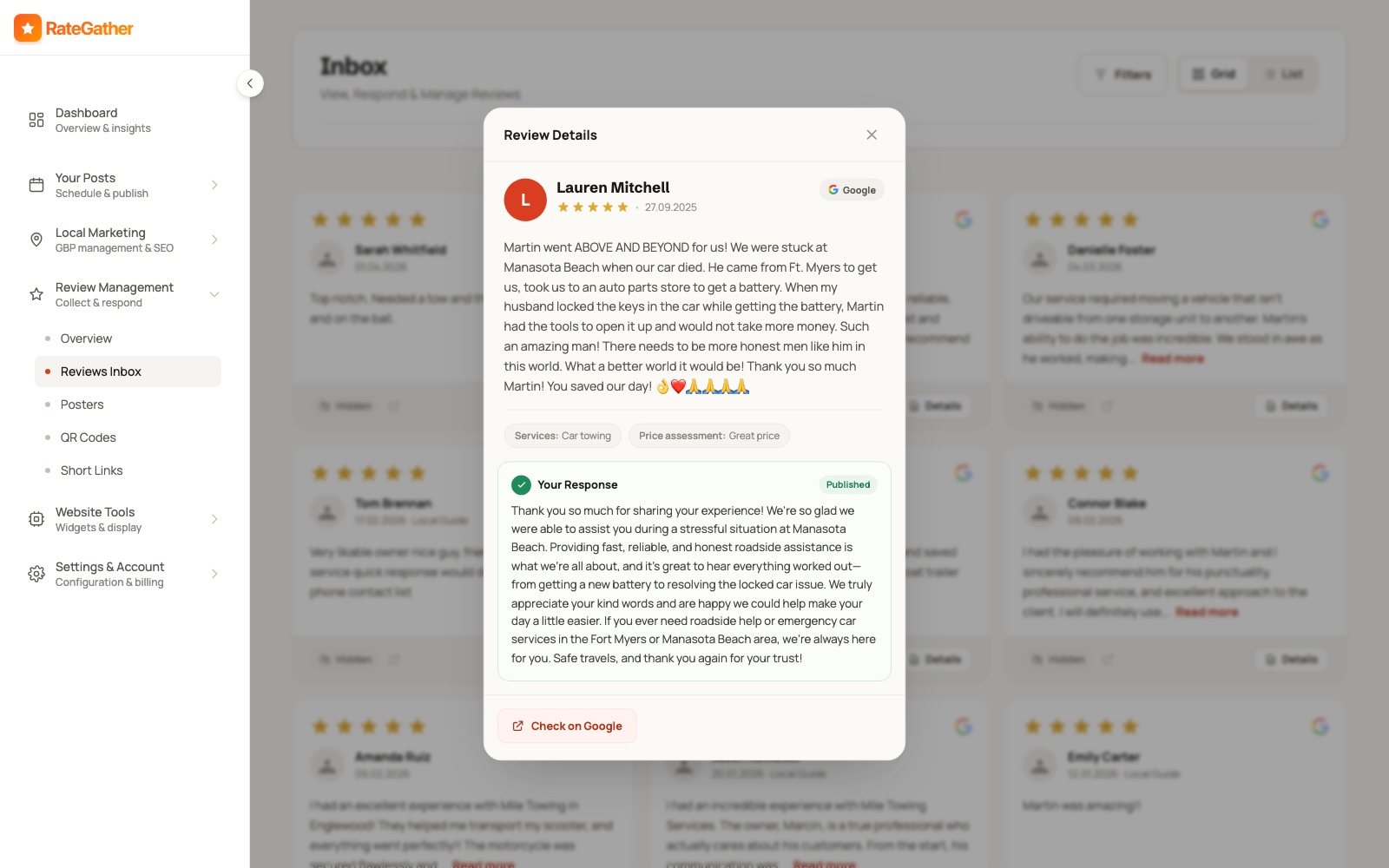
This is where AI-drafted replies earn their keep for a dental practice specifically: RateGather drafts an on-brand reply the moment a new review lands, and because you approve every one before it publishes, you keep a person in the loop to catch anything that drifts toward confirming a patient or naming a procedure. Use it to move fast and stay consistent — not to auto-publish blind on a review type where the wrong sentence carries real regulatory risk. This section only covers the ask and the reply; 16 ways to get more Google reviews is the full tactical playbook, including timing, wording, and exactly what not to do to stay inside Google's policy. Build a deep, recent, steadily growing review bank and let each reply show future patients a calm, professional practice — without ever saying a word about who was in the chair.
Step 3
Track Where You Actually Rank
A single 'are we #1' check hides more than it shows. Map-pack ranking varies by exact location — a practice can rank #1 on the block where the office sits and #9 in the neighborhood one town over, in the same city, for the same search — and a family choosing a dentist searches from where they live, not from your parking lot.
That's what a grid rank tracker is for: instead of one search from one point, it checks your ranking position from dozens of points spread across your actual service area and plots them on a real map, so you can see exactly where you're strong and where a competitor is beating you — not just a single number that might be true from your front desk and false three blocks away. For a practice that draws families from several surrounding suburbs, those outer squares of the grid are where a lot of your best long-term patients are searching from.
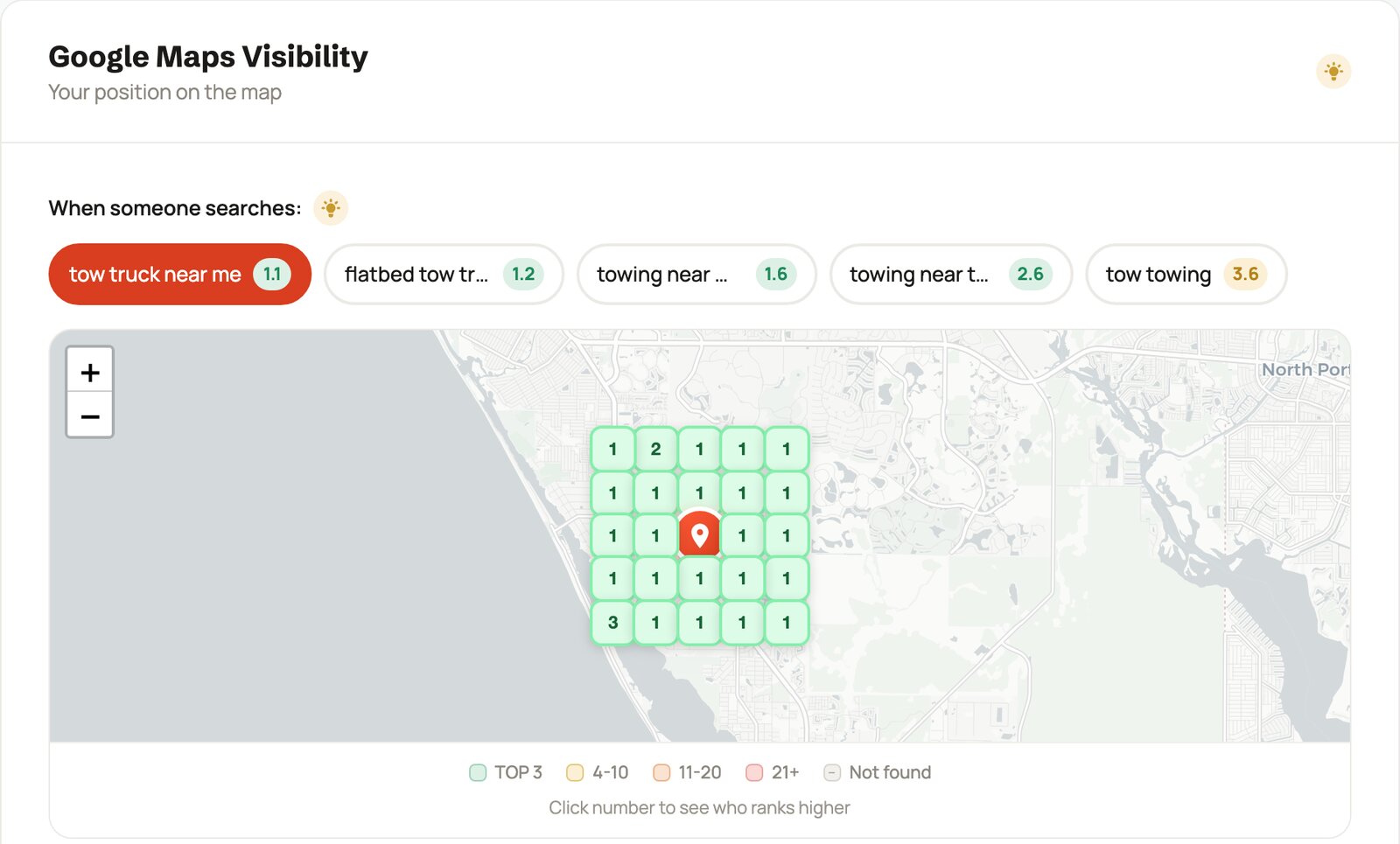
For a dental practice, track the high-intent core first — dentist near me, dentist +
[your city], emergency dentist, dentist open Saturday — alongside the
higher-value, more-considered procedure terms that bring in patients researching a bigger decision, like
dental implants, cosmetic dentist, and teeth whitening + [your city].
Those procedure searches convert into exactly the high-value cases that justify the effort, so it's worth
knowing whether you show up for them or whether a specialist across town owns that visibility. RateGather's
dashboard runs this as a daily grid check, with 2 reports a month on Free and 30 a month plus competitor
monitoring on Autopilot, so you can see precisely where a competitor outranks you and by how far.
Dental demand isn't perfectly flat, either, and your tracked keyword mix can reflect it: whitening and
cosmetic searches climb ahead of weddings and graduations in late spring, and "new dentist" and checkup
searches spike in January when fresh insurance benefits reset and, again, in the fourth quarter when
families rush to use flexible-spending-account dollars before they expire at year-end. Watching the same
handful of terms in isolation misses these swings. Competitor monitoring on Autopilot pairs with this well
— if a nearby DSO or a new practice jumps ahead of you on dental implants or dentist
near me right as one of those windows opens, that's the moment to know, not next quarter.
Check your dental practice's ranking, free
Run a real 9-point grid check for any keyword and location, no signup or credit card required — see exactly where you rank around your own office right now.
Step 4
Create Content That Answers the Insurance and Anxiety Questions
The questions people search — and increasingly ask an AI assistant — before booking a dentist are specific and repetitive: does this office take my insurance, how much does a procedure cost, will it hurt, and are they gentle with nervous patients. Content that answers those directly is what shows up for them.
This isn't about generic "why choose us" pages. A profile and a site that keep publishing — Google Business Profile updates plus a handful of articles a month, tuned to your actual procedures, insurances, and area — read as an active, current practice; one frozen since last year reads as abandoned, to both a patient scanning results and to an AI assistant weighing which office to name. Framed honestly: this makes you more likely to surface in Google and AI recommendations for the questions patients are actually asking — it is not a ranking guarantee, and nobody who tells you otherwise is being straight with you.
The single biggest content opportunity in dentistry is insurance intent. A large share of patients decide by coverage first and dentist second, and they search things like "dentist that takes [insurance name]" and "does [insurance] cover implants." Most practices never write for these queries at all, which leaves the ground wide open: a clear page or post naming the plans you accept, whether you're in-network, and what a patient can expect to pay with and without coverage captures searches your competitors are ignoring — and it answers, in public, the question your front desk answers on the phone twenty times a day.
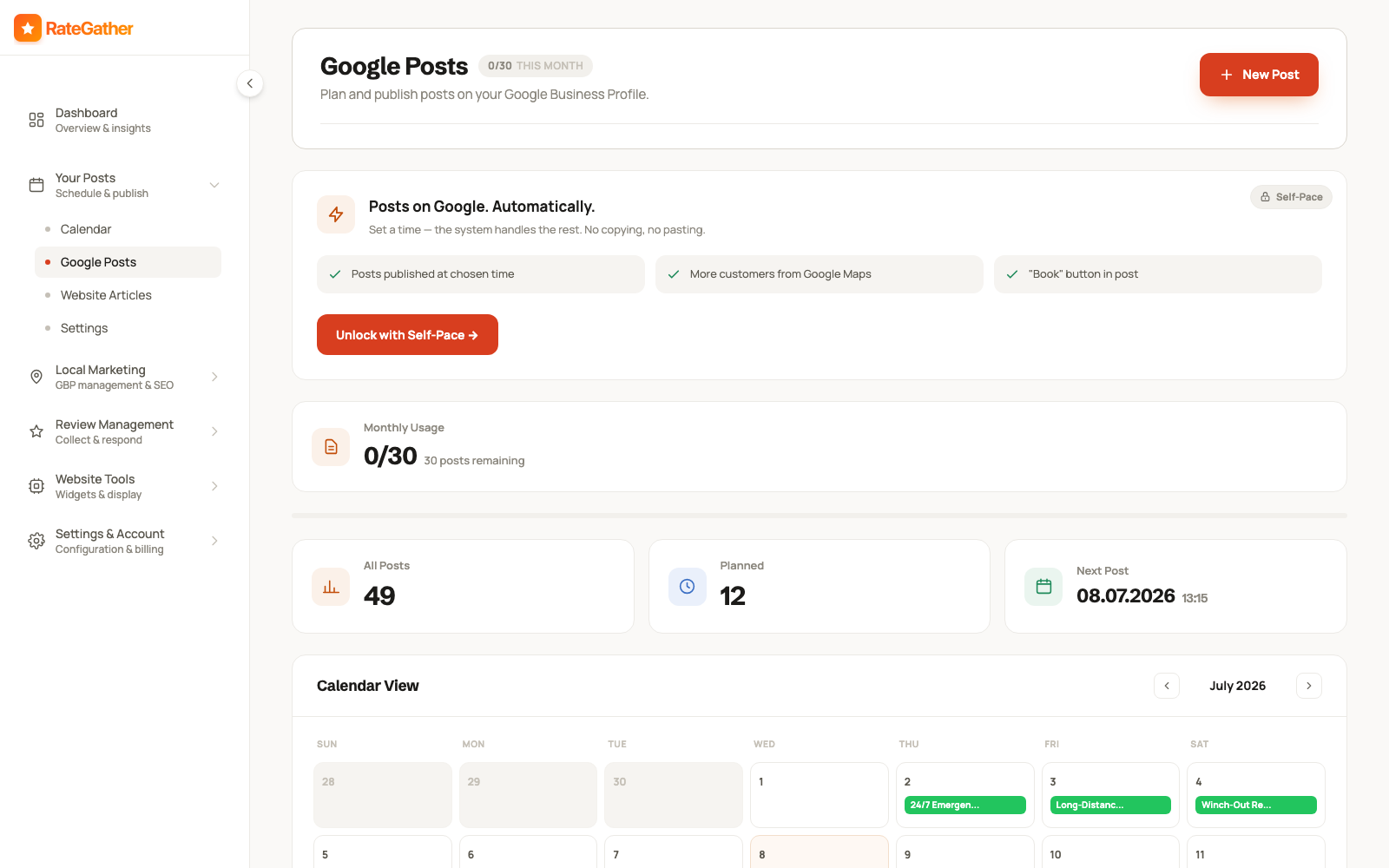
A handful of topics cover most of what people actually search for before booking, and they double as genuinely useful Google Posts or short blog articles:
- Which insurance plans you accept, whether you're in-network, and what a first visit typically costs with and without coverage.
- What a specific procedure actually involves and roughly what it costs — implants, crowns, root canals, whitening — in plain, reassuring language.
- "Does a root canal hurt?" and similar pain-and-anxiety questions, answered honestly, for the nervous patient who's been putting off a call.
- What to do about a dental emergency — a knocked-out tooth, a broken filling, sudden severe pain — before you can get in.
- How often to come in and why, and what a cleaning and checkup actually includes, for the patient who hasn't been in years.
- Options for anxious patients or kids — sedation, gentle techniques, what a first pediatric visit looks like.
Pair each Google Post with a matching item on your site's content calendar, so the same topic reinforces your profile and your website at once instead of living in only one place — and so the higher-value cosmetic and implant content is in place before the seasons that drive it.
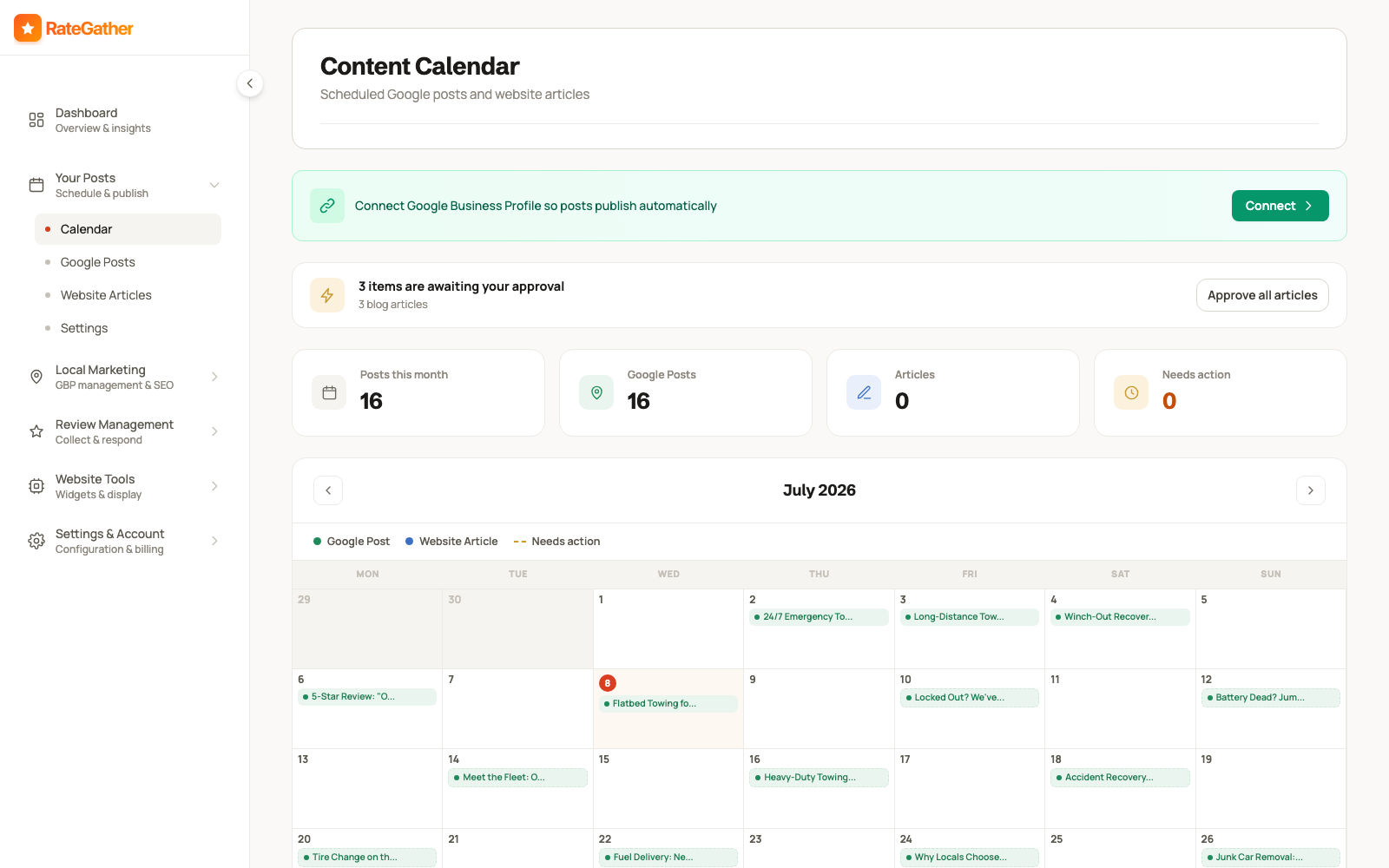
RateGather's AI drafts Google Business posts and blog articles about dental topics — oral-health tips, procedure explainers, insurance and cost questions, and calming answers for anxious patients — on a schedule you set, then you either approve each one or let it auto-publish. Free includes 1 AI Google post and 1 blog draft a month; Autopilot includes 30 posts and 6 articles a month, enough to keep a profile and a site both looking active without writing any of it between patients yourself. As always, keep specific clinical claims and any patient-related detail out of published content the same way you keep it out of review replies.
Step 5
Keep NAP and Listings Consistent
NAP is your practice's Name, Address, and Phone number — and it has to match, character for character, everywhere it appears: your Google Business Profile, your website, and every directory, health platform, and insurance network that lists you.
Practices accumulate mismatches almost by accident. A suite number gets dropped on one listing. "Dr. Jane Smith, DDS" appears one place and "Smith Family Dental" another. A phone number changes when you switch answering services but only gets fixed on the website. On their own, small differences rarely sink a listing. In aggregate, they chip away at how confident Google is that every mention of your practice points to the same real office at the same address — so a periodic manual pass is worth more than any one-time fix.
Dentistry carries a couple of citation sources most trades don't, and they're the ones patients actually use. Beyond the general directories — Google Business Profile, your website's footer and contact page, Yelp, Nextdoor, the Better Business Bureau — a practice tends to also live on health-specific platforms like Healthgrades and Zocdoc, on the ADA's find-a-dentist tool, and, crucially, inside the provider directories of every insurance network you're in. Those insurance directories matter twice over: patients filter for dentists straight from their plan's website, and an outdated address or a dead phone number there both loses you the patient and sends Google a conflicting signal. Search your practice name plus your city, see what turns up, and request a correction or removal on any stale listing from an old address or a retired phone line rather than leaving wrong information live.
To be clear about what's product and what's practice: RateGather has no automatic citation scanner, so this step stays a manual one. Where your own website is concerned, though, you can make the confirmation easy for Google — publish LocalBusiness or Dentist structured data carrying exactly the same name, address, and phone as your profile. RateGather's free schema generator outputs that JSON-LD for a dental practice in a few minutes, no signup required, so the markup on your site and the details on your profile tell search engines the same, single story about who and where you are.
Putting it together
These Five Steps Aren't a Checklist You Finish Once
Run all five once and you'll see a short-term lift. The practices that keep filling the schedule with new patients treat them as a habit the front office keeps, not a project the office manager closes out in a week.
Trust doesn't hold its value on a shelf. A profile you completed perfectly in January reads as a little less current by summer if nobody touches it. The review bank you built before a marketing push goes stale the moment you stop asking at checkout, and a nervous new patient scrolling reviews notices when the most recent one is fourteen months old. Content published once and forgotten stops answering the insurance and cost questions this season's patients are typing right now. The practices that consistently show up first aren't the ones who "did SEO" for a month — they're the ones who kept the profile current, asked every patient for a review at checkout and replied to each one carefully, watched the grid as competitors moved, and kept publishing the answers patients search for, on an ongoing rhythm measured in weeks.
That habit is the whole reason RateGather is software instead of a one-time audit. Run the free tools above — the review link generator, the rank checker, the schema generator — as manual spot-checks whenever you like. The app's job is the repeating half: prompting reviews after visits, drafting replies that keep a human in the loop before anything patient-related goes public, running the daily grid, and shipping the posts — so the loop keeps turning while you and your team are actually chairside with patients.
What it costs
What This Costs
No hidden retainer, no setup fee — the exact figures a dental practice sees on RateGather.
Free — $0/mo
Autopilot — $79/mo ($63/mo yearly)
Against the lifetime value of a single retained new patient, a plan like this pays for itself many times over. See the full feature-by-feature breakdown for a dental practice on /industries/dentist, or compare against the wider local SEO category on pricing.
Straight answers
Frequently asked questions
Months rather than days, and how many depends on how competitive your area is and where you're starting from. Dentistry is a slower, higher-trust decision than an emergency trade — a prospective patient often reads your reviews for a week before booking a first cleaning — so the honest measure is your grid rank tracker climbing and your review count building over a season, not a promised position by a promised date. Anyone guaranteeing a fixed ranking is not being straight with you.
There's no official number, but reviews carry more weight for a dentist than for almost any local business, because a patient is choosing who to let work inside their mouth for years, not who to call once. Practices with a deep, recent bank of reviews get chosen over ones with a thin or stale record even at a higher price. Treat a steady stream of new reviews as the goal, not a single milestone number, and keep the flow going long after you're happy with the total.
Not the same way. Because you're a covered entity under HIPAA, a public reply cannot confirm the reviewer is or was a patient and cannot reference any treatment detail — even a warm "thanks for coming in, glad the cleaning went well" acknowledges a care relationship and is a violation. The HHS Office for Civil Rights has fined dental practices for exactly this. Reply with a generic, PHI-free line that thanks them for the feedback and invites a private conversation — see HHS's HIPAA guidance for providers. This is general information, not legal advice; check with your own compliance counsel.
Right at checkout, while they're still at the front desk after a comfortable visit, with a QR code at reception and a follow-up text carrying your direct review link sent that afternoon. A cleaning that ran smoothly and a numb cheek that's wearing off is a far better moment than an email a week later that competes with everything else in their inbox. See RateGather's free review link generator to build the link and QR code.
Google Business Profile is the single highest-leverage asset for "dentist near me" and emergency searches — it's usually the first thing a prospective patient sees. But dentistry sells trust and considered, sometimes expensive procedures, so a website is where a nervous new patient decides you're the calm, modern practice they want: your team, your office, your insurance and financing details, and procedure explanations. Neither replaces the other — see websites for dentists for that side.
It helps you show up for the specific things patients, and increasingly AI assistants, ask about — "does this dentist take my insurance," "how much do implants cost," "is a root canal painful," "emergency dentist open Saturday" — rather than guaranteeing a ranking jump. A profile and site that keep publishing read as an active, current practice; ones frozen for a year read as abandoned. Treat AI content as a way to be present for those questions, not a shortcut around the rest of this guide.
Two plans. Free at $0/mo covers the basics a practice needs to see where it stands: 1 ranking report, 1 AI Google post, 5 AI review replies a month, QR codes, and a review widget. Autopilot at $79/mo ($63/mo billed yearly) runs the recurring work: 30 ranking reports, competitor monitoring, daily review checks, 30 AI Google posts, and 6 blog articles a month. No credit card required to start on Free.
Yes. Sending the review link only to patients you already know were happy, or steering an unhappy one to a private form instead of the public review, is called review gating, and it's explicitly against Google's own review policy. Ask every patient the same way and let the review land where it lands — see 16 ways to get more Google reviews for the full, policy-safe playbook.
This page is the how-to: the five-step framework, in order, with the reasoning behind each step. /industries/dentist is the shorter product page — what RateGather specifically does for a dental practice, and what it costs. Read this one first if you want the playbook; go there if you already know you want the software.
This guide is the playbook. For the wider category beyond dentistry, see local SEO services; for the dental-specific product page with the full feature list, see /industries/dentist; and if you also need the website that turns those clicks into booked patients, see websites for dentists — the sort of calm, modern site behind our Maple Grove Dental demo (a fictional demo practice we built to show the format).
Start showing up when the next family searches for a dentist.
Free plan available, no credit card required.
No contract. No ranking guarantees. Cancel anytime.